
For personal portfolios, blogs, and SaaS landing pages, paying for infrastructure is a thing of the past. By combining the serverless deployment velocity of Vercel Free with the enterprise-grade caching, security, and edge performance of Cloudflare Free, you can construct a resilient, high-speed zero-dollar production stack that comfortably handles tens of thousands of monthly visitors for exactly ₹0/month.
The Architecture: Vercel and Cloudflare in Harmony
A common mistake developers make when deploying Next.js is choosing between Vercel and Cloudflare. The truth is, they are not mutually exclusive—they work best when combined. Vercel acts as your application backend and deployment orchestrator, while Cloudflare serves as your global edge protection and caching layer.
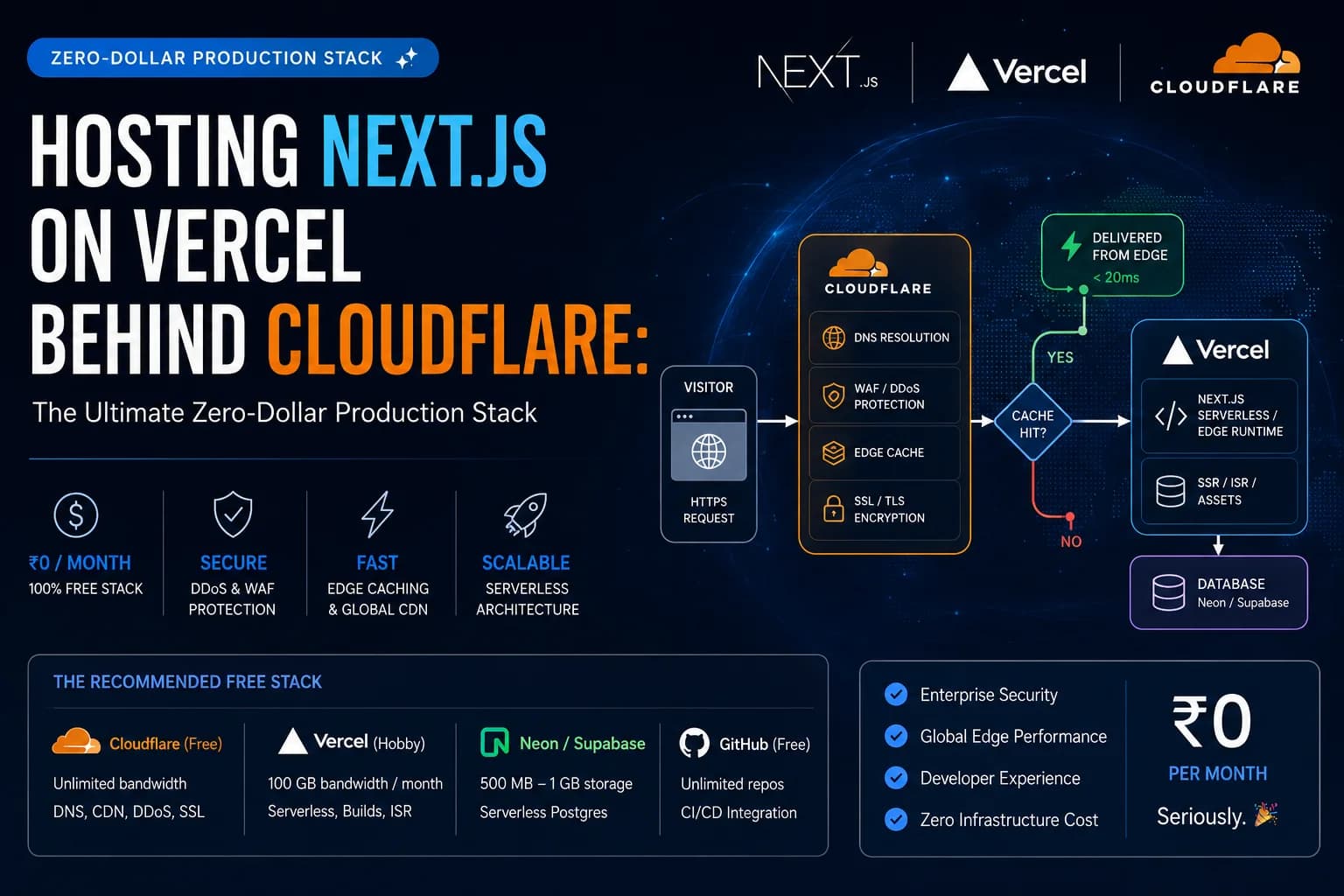
This is the request routing topology for this architecture:
          flowchart LR
            User([Visitor Browser]) -->|HTTPS Request| CF{Cloudflare Edge}

            subgraph Cloudflare [Cloudflare Free Layer]
              CF -->|1. DNS Resolution| DNS[Cloudflare DNS]
              CF -->|2. Threat Shield| Security[WAF / DDoS / Bot Shield]
              CF -->|3. Edge Cache Check| Cache{Cache Hit?}
            end

            subgraph Vercel [Vercel Free Origin]
              Origin[Vercel Serverless / Edge Runtime]
            end

            Cache -->|Yes < 20ms| User
            Cache -->|No / Bypass| Origin
            Origin -->|SSR / ISR / Assets| Cache
            Origin <--> DB[(Neon / Supabase)]

            style CF fill:#f38020,stroke:#000000,color:#ffffff
            style Origin fill:#000000,stroke:#000000,color:#ffffff
            style DB fill:#111111,stroke:#00e599,stroke-width:2px,color:#ffffff
Why Vercel for Next.js?
While you can run Next.js entirely on Cloudflare Pages/Workers, deploying to Vercel offers distinct advantages:
- Native Compatibility: Next.js is maintained by Vercel. New features, server components, and performance upgrades work instantly without edge compatibility layers or custom configuration.
- One-Click Git Workflows: Push to GitHub and get immediate production deployments.
- High-Fidelity Preview Environments: Every pull request generates a unique preview URL, enabling seamless testing before publishing.
- Less Troubleshooting: Bypassing the Edge Runtime limitations (such as missing Node.js APIs) avoids debugging edge polyfill errors during builds.
The Cloudflare Edge Layer
By putting Cloudflare in front of Vercel, you unlock enterprise security and caching capabilities on Vercel's free tier:
- DNS Resolution: Cloudflare runs the fastest global DNS network, reducing time-to-first-byte (TTFB).
- DDoS & Bot Shield: Instantly blocks layer 7 attacks, scraping scripts, and spam bots before they hit Vercel, protecting your serverless execution limits.
- Edge Caching: Cache static HTML pages and images closer to your visitors, meaning Vercel serverless functions are only called on cache misses.
The Recommended Free Stack
For a developer website or high-authority blog like dattasable.com, this setup handles traffic spikes gracefully:
| Layer | Service Provider | Free Tier Capacity | Key Function |
|---|---|---|---|
| Domain DNS & CDN | Cloudflare (Free) | Unlimited queries & bandwidth | DNS resolution, DDoS protection, edge caching, and SSL termination. |
| Hosting & Serverless | Vercel (Hobby) | 100 GB bandwidth / month | Next.js serverless orchestration, preview builds, and ISR generation. |
| Database | Neon / Supabase (Free) | 500 MB - 1 GB storage | Serverless PostgreSQL storage for CMS content, users, and logs. |
| Source Control | GitHub (Free) | Unlimited private repositories | Version control and automated Vercel CI/CD triggers. |
Step-by-Step Configuration Blueprint
1. Point Domain to Cloudflare
Sign up for a free Cloudflare account, add your domain, and copy the assigned nameservers. Head to your domain registrar (e.g., Namecheap, GoDaddy) and replace the default nameservers with Cloudflare's.
2. Configure Vercel Integration
In your Vercel project, go to Settings > Domains. Add your custom domain (e.g., dattasable.com). Vercel will give you a CNAME target (e.g., cname.vercel-dns.com) or an A record IP address.
3. Configure Cloudflare DNS Rules
Inside the Cloudflare dashboard under **DNS**, create a **CNAME record** pointing your subdomain (or root) to Vercel's target:
- Type: CNAME
- Name: @ (or www)
- Target: cname.vercel-dns.com
- Proxy Status: Proxied (Orange Cloud enabled)
In Cloudflare under SSL/TLS, ensure your encryption mode is set to Full or Full (Strict). If it is set to "Flexible," Cloudflare will request your Vercel origin using HTTP. Vercel redirects HTTP to HTTPS automatically, creating an infinite redirect loop (ERR_TOO_MANY_REDIRECTS).
4. Setup Cache Rules to Save Vercel Bandwidth
To ensure Cloudflare caches your content effectively and stays within Vercel's 100 GB free limit, navigate to Caching > Cache Rules on Cloudflare and create a rule to cache static resources (like images, CSS, and JS) and pages with cache-control headers.
Conclusion: Enterprise Capabilities, Zero Cost
By routing your traffic through Cloudflare before it hits Vercel, you get the absolute best of both worlds. Vercel manages Next.js server actions, API routes, and builds smoothly, while Cloudflare intercepts and caches requests at the edge. For a personal brand, agency, or high-performance blog, this setup represents the gold standard of architectural value.