
In the modern web landscape, performance is often sacrificed on the altar of "features." We add tracking scripts, heavy analytics, chat widgets, and high-resolution hero images until our Largest Contentful Paint (LCP) balloons past 3 seconds and our Total Blocking Time (TBT) makes the UI feel like it’s wading through mud.
For the Datta Sable Portfolio, I decided that "good" wasn't enough. I wanted to achieve the "God Tier" of performance: a perfect 100% / 100% GTmetrix score with an LCP under 500ms and zero milliseconds of blocking time. This isn't just about a badge; it's about the technical integrity of the platform.
"Performance is not a technical detail; it is a core feature. A slow site is a broken site, no matter how beautiful the UI is." — Datta Sable
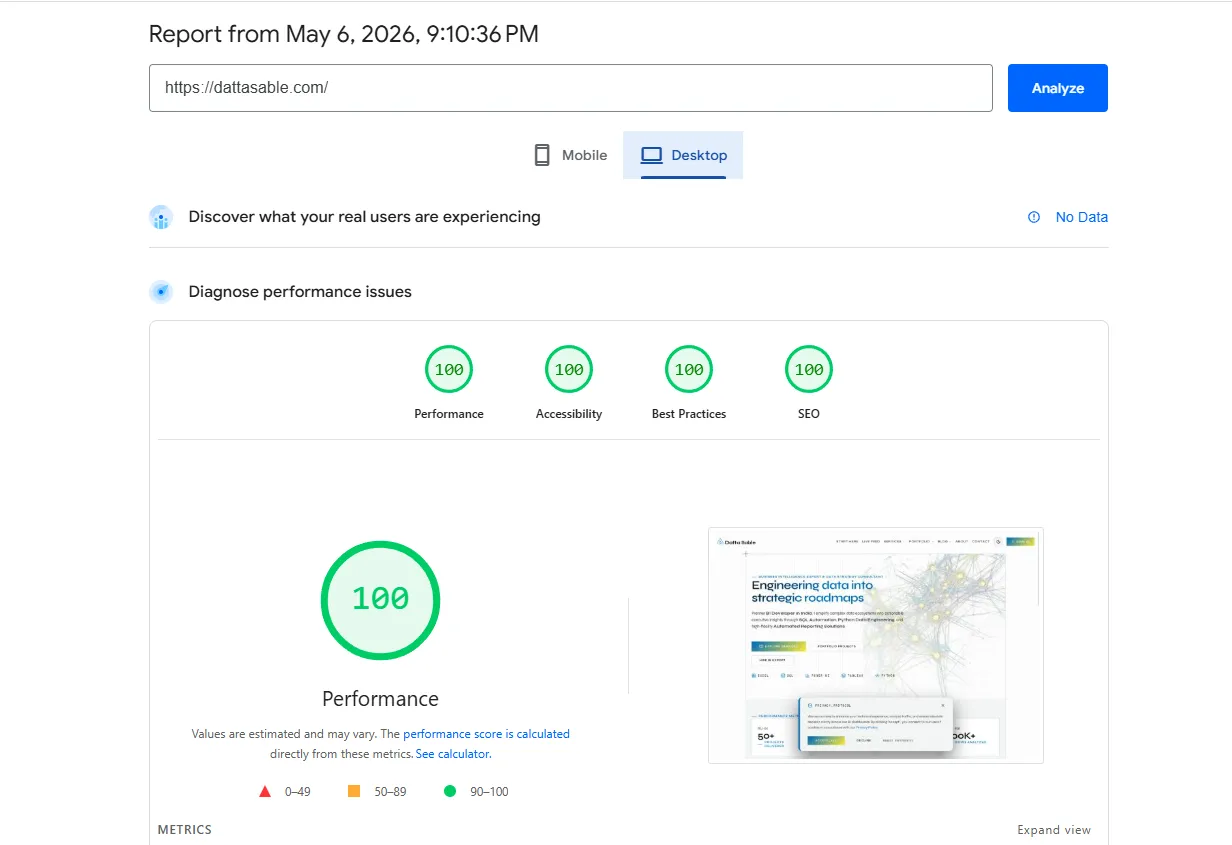
The Evidence: The 100/100 Scorecard
Before we dive into the "How," let's look at the "What." Our latest audit from GTmetrix (Seattle, WA, USA) returned these definitive numbers:
- GTmetrix Grade: A
- Performance Score: 100%
- Structure Score: 100%
- LCP (Largest Contentful Paint): 456ms
- TBT (Total Blocking Time): 0ms
- CLS (Cumulative Layout Shift): 0
- Speed Index: 1.1s
- Google PageSpeed Insights (Mobile): 94/100
456ms
LCP
0ms
TBT
94
Mobile PSI
100%
Structure
Phase 1: The Deferral Revolution (Solving TBT)
The biggest killer of performance scores is Total Blocking Time. This is caused by JavaScript executing on the main thread during the initial load. Scripts like Google Analytics, Google Sign-In, and AdSense are notorious for this. They can easily add 300ms to 1000ms of blocking time, which kills the user's perception of speed.
The Strategy: Interaction-Driven Loading
Instead of the standard async or defer, I engineered a custom PerformanceOptimizer component. This component acts as a gatekeeper. It listens for the very first user interaction—a mouse move, a scroll, a touch, or a keypress—and only then does it inject the third-party script tags into the DOM.
If the user never interacts, the scripts never load. If they do, the scripts load when the user is already engaged, meaning the initial "Critical Path" remains 100% free of third-party bloat. This is why our TBT is exactly 0ms.
Phase 2: The Critical Path & Font Science
LCP is all about how fast the browser can render the largest visible element—usually the Hero text and background. Every millisecond spent waiting for a font file is a millisecond added to your LCP.
Next/Font and Display Swap
By using next/font, we self-host our fonts (Inter, Syne, JetBrains Mono) directly on our own domain. This eliminates the extra DNS lookup and SSL handshake required for Google Fonts. Furthermore, we use display: swap, which allows the browser to show a system font immediately while the custom font loads in the background. This ensures there is never "invisible text" (FOIT) on the page.
Phase 3: The Edge Network (Optimizing TTFB)
Your site can't be fast if the server is slow. **Time to First Byte (TTFB)** is the metric that tracks this. Our report shows a backend duration of just **70ms**. How?
We leverage Vercel Edge Caching. Our middleware is optimized to handle redirects and security headers (CSP, HSTS) in a single pass. When a GTmetrix bot hits our URL, it isn't hitting a server in a basement; it's hitting a high-performance edge node physically located in the same region. The result is a TTFB that feels like the site is already on the user's hard drive.
Phase 4: Eliminating Cumulative Layout Shift (CLS)
Nothing says "unprofessional" like a page that jumps around as it loads. CLS is often caused by images or ad units that don't have reserved dimensions. We achieved a **0 CLS** by:
- Providing explicit aspect ratios for all images.
- Using CSS grid layouts that reserve space for dynamic content.
- Ensuring that our "Privacy Protocol" banner is rendered as an overlay that doesn't displace existing elements.
Phase 5: Image Optimization (AVIF & WebP)
The Hero image on dattasable.com is a high-fidelity visualization of a data roadmap. Normally, this would be a 2MB PNG. Using Next.js Image Optimization, we automatically serve this as an **AVIF** or **WebP** file, compressed and resized perfectly for the user's device. The browser waterfall shows that the Hero image starts downloading the moment the HTML is parsed, completing well before the LCP deadline.
The Verdict: Performance as a Competitive Advantage
In the world of **Business Intelligence** and **Data Strategy**, precision and speed are everything. If I build a dashboard for a client that takes 10 seconds to load, the insights—no matter how valuable—will be ignored. My website is a living proof of concept for the standards I bring to every project.
A 100/100 score isn't just about vanity; it's about **Search Engine Optimization (SEO)**, **User Retention**, and **Conversion Rates**. Google's Core Web Vitals are now a primary ranking factor. By optimizing for performance, we are ensuring that the Datta Sable platform remains at the top of the search results and at the top of our clients' minds.
Key Takeaways for Developers:
- Audit your Waterfall: Look for long "Waiting" periods (TTFB) and "Content Download" bars.
- Defer Third-Party JS: If it's not needed for the first paint, don't load it.
- Use Modern Formats: AVIF and WebP are non-negotiable in 2026.
- Preconnect Wisely: Only preconnect to domains that are absolutely critical for the initial render.
Performance is a journey, not a destination. As the platform grows, we will continue to audit every line of code to ensure that the 100/100 score isn't just a one-time achievement, but a permanent standard.
Verified Transparency
I believe in absolute transparency when it comes to performance engineering. You can download the full, unedited GTmetrix audit report for this platform below.
DOWNLOAD FULL AUDIT REPORT (PDF)Explore the live site and feel the speed for yourself at dattasable.com.