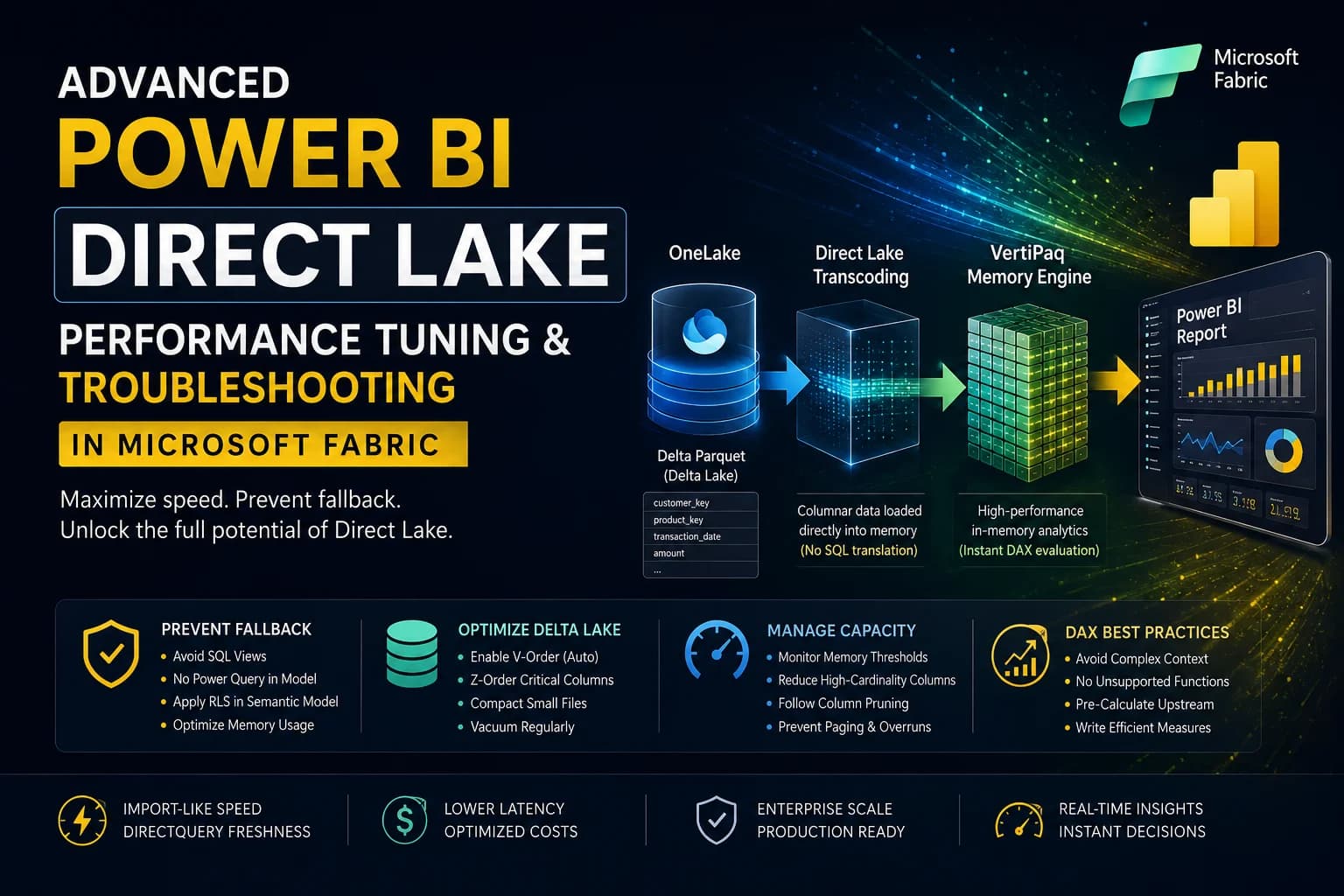

Direct Lake is the holy grail of Power BI connectivity. By reading Delta Parquet files directly from OneLake without importing data or converting queries to SQL, it promises the performance of Import mode with the real-time nature of DirectQuery. However, in enterprise settings, many teams run into performance bottlenecks or unexpected fallbacks to DirectQuery. This guide details the advanced mechanics of Direct Lake, troubleshooting fallback triggers, and performance tuning strategies for production-grade semantic models.
For BI professionals and data engineers working in Microsoft Fabric, understanding the storage-to-viz pipeline is critical. When Direct Lake works, it is blisteringly fast. When it fails, your capacity costs skyrocket and report load times suffer. Let's walk through how to keep your models in Direct Lake mode at all times. Before tuning memory, ensure you've mapped out the governance and security considerations for Direct Lake.
Table of Contents
- 1. The Mechanics of Direct Lake: How It Works
- 2. Preventing Fallback to DirectQuery Mode
- 3. V-Order, Z-Order, and Delta Lake Compaction
- 4. Capacity Memory Paging & Paging Thresholds
- 5. High-Performance DAX Design for Direct Lake
- 6. Frequently Asked Questions (FAQ)
1. The Mechanics of Direct Lake: How It Works
To optimize Direct Lake, we must first understand how it bypasses traditional query translation. In Import mode, data is loaded into the Analysis Services memory engine (VertiPaq) and compressed. In DirectQuery mode, the engine translates DAX queries on-the-fly into native SQL dialects and executes them against the data source.
Direct Lake bridges this gap. When a user interacts with a report, the Power BI engine checks if the required column is already in memory. If not, it directly loads the columnar Delta Parquet files from OneLake straight into the VertiPaq memory engine. No relational SQL engine or Spark compute is involved. This is known as transcoding, and it occurs automatically without user intervention.
    flowchart LR
      OneLake[(OneLake Delta Parquet)] -->|Transcoded Direct Load| VertiPaq[VertiPaq Memory Engine]
      VertiPaq -->|Instant DAX Evaluation| Report[Power BI Report]
2. Preventing Fallback to DirectQuery Mode
The most common issue with Direct Lake is **DirectQuery Fallback**. When fallback occurs, the report silently switches to translating DAX queries into T-SQL and running them against the SQL endpoint of your Lakehouse or Warehouse, causing significant latency. Here are the primary triggers for fallback and how to fix them:
| Fallback Trigger | Description | Mitigation Strategy |
|---|---|---|
| SQL Views | Referencing a SQL View instead of a Delta Table in the semantic model. | Only include physical Delta tables. materialized through Spark or Data Factory. |
| Unsupported Schema Modification | Using Power Query (M) in the semantic model to merge, split, or transform columns. | Keep the semantic model in "Direct" layout. Move all transformations upstream to ETL (Spark/dbt). |
| Object-Level Security (OLS) | Applying OLS or Row-Level Security (RLS) on the Lakehouse SQL endpoint. | Apply RLS/OLS directly inside the Power BI Semantic Model, not at the SQL database layer. |
| Memory Cap Overrun | The size of the columns loaded in memory exceeds the capacity limit. | Optimize data types, compress columns, and manage column retention. |
3. V-Order, Z-Order, and Delta Lake Compaction
Direct Lake depends heavily on file-level performance. Because VertiPaq is loading parquet pages into memory directly, the sorting and structural density of these files determines your query speed.
V-Order is a Microsoft-proprietary sorting algorithm applied to Delta Parquet files. It sorts data inside the parquet columns to match the internal structure VertiPaq expects, which reduces load times by up to 50% and improves compression ratios. V-Order is enabled by default on all Fabric-written tables (via Spark, Data Factory, or Warehouse writing engines).
However, if you write to OneLake using external engines (like Databricks or Synapse 3.x without Fabric integration), you must optimize the tables manually to apply V-Order:
-- Optimize table structure and apply sorting
OPTIMIZE gold_sales_reporting
ZORDER BY (customer_key, transaction_date);
Frequent updates to your Lakehouse will create many small files. Run Delta compaction regular to consolidate these files, preventing the "many-small-files" penalty during memory transcoding:
# Run Delta optimization via PySpark notebook
spark.sql("OPTIMIZE gold_sales_reporting")
spark.sql("VACUUM gold_sales_reporting RETAIN 168 HOURS")
4. Capacity Memory Paging & Paging Thresholds
Every Fabric capacity SKU (from F2 to F2048+) has a dedicated memory threshold allocated to the Analysis Services engine. If your semantic model's active columns exceed this limit, the engine will page out the least recently used columns to disk to make room for new queries. If the total active set exceeds the threshold, the model falls back to DirectQuery.
Architectural Rule: The Column Pruning Principle
Only transcode what you visualize. In a table of 100 columns, if a visual only displays 3 columns, only those 3 columns are transcoded into VertiPaq memory. Avoid using high-cardinality keys, GUIDs, and system timestamps in visual cards, as they force massive, expensive columns into memory, pushing your capacity towards the paging limit.
5. High-Performance DAX Design for Direct Lake
Writing DAX for Direct Lake is slightly different from Import mode. In Import mode, VertiPaq handles poorly written DAX with raw memory speed. In Direct Lake, bad DAX can trigger fallback to DirectQuery. Avoid the following patterns:
- Avoid Complex Context Transitions: Nested
CALCULATEfunctions inside iterators (likeSUMXorFILTER) cause the engine to evaluate millions of distinct filters. If this exhausts the local memory buffer, it forces a fallback. - Do Not Use Unsupported Functions: Avoid using dynamic formatting strings or features that rely on external SQL schemas during query execution.
- Pre-Calculate Upstream: If you need text cleaning, string concatenations, or conditional flags (e.g.,
IF(col == 'A', 'Yes', 'No')), write them as columns in your Bronze/Silver Spark transformation layer. This ensures the columns are compressed and optimized inside the Delta Parquet files.
6. Frequently Asked Questions (FAQ)
Q1: How do I know if my semantic model has fallen back to DirectQuery?
Use SQL Server Management Studio (SSMS) or DAX Studio to connect to the XMLA endpoint of your workspace. Run a DMV query against $System.DISCOVER_CONNECTIONS or profile the queries using SQL Server Profiler to see if the engine is executing SQL SELECT statements against the endpoint.
Q2: Does Direct Lake update automatically when data changes in OneLake?
Yes. Direct Lake has a setting called "Keep your Direct Lake data up to date" (automatic frame update). When enabled, any write operation committed to the Delta Lake tables will signal the semantic model to refresh its file pointers and load the new data without requiring a full model refresh.
7. Conclusion
By shifting your data modeling and transformation pipeline upstream into Spark and keeping your semantic models clean, you can fully exploit the raw speed of Direct Lake. Combine Delta compaction, V-Order sorting, and efficient column selection to build enterprise-scale dashboards that load in milliseconds at zero extra capacity cost.