
Microsoft Fabric Governance & Microsoft Purview: The Complete Enterprise Guide to Security, Compliance & Data Governance (2026)
Microsoft Fabric simplifies the technology stack by bringing data engineering, analytics, BI, real-time intelligence, and AI onto a unified platform. But consolidation creates a governance challenge of its own: when teams can create workspaces, connect data, build semantic models, and publish analytics from the same platform, who owns the data, who controls access, and how do you prove that sensitive information is being handled correctly?
This guide provides the complete architectural framework, practical policies, and implementation roadmap for securing and governing Microsoft Fabric. We will cover why enterprise governance matters in this unified ecosystem, how it fundamentally shifts the operating model, and exactly what policies Domain Admins and Fabric Administrators should enforce.
Executive Summary
As organizations transition to Microsoft Fabric, they quickly realize a fundamental truth: Fabric removes infrastructure friction, but it does not remove ownership problems. If five business units can independently create workspaces, publish semantic models, and expose data via OneLake shortcuts without a common governance model, the platform becomes unauditable long before it becomes technically difficult to operate.
Fabric governance matters because centralized architecture amplifies the impact of poor data management. Microsoft Purview contributes the enterprise-wide cataloging, classification, and compliance layer that sits above Fabric’s platform-specific controls. Governance in this context covers everything from how workspaces are named and who can deploy to production, down to row-level security and data lifecycle management.
This guide is designed for Enterprise Architects, Data Governance Managers, and Senior Analytics Engineers. We will explore the major architectural decisions you must make—from structuring domains and organizing OneLake to enforcing least-privilege access and separating development from production workloads.
Microsoft Fabric Governance Quick Start
Phase 1 — Establish ownership
- • Define Fabric platform ownership
- • Define domain ownership
- • Define workspace ownership
- • Establish RACI
Phase 2 — Secure access
- • Entra ID groups
- • Least privilege
- • Workspace roles
- • Administrative separation
Phase 3 — Govern data
- • OneLake
- • Classification
- • Sensitive data
- • Lineage & Discovery
Phase 4 — Govern deployment
- • Development
- • Test
- • Production
- • Change management
Phase 5 — Monitor
- • Capacity
- • Usage
- • Security & Compliance
- • Data quality
Phase 6 — Mature
- • Automation
- • Policy enforcement
- • Continuous monitoring
- • Governance metrics
Key Takeaways
- Centralization Requires Intentional Boundaries: OneLake centralizes storage, but governance still needs logical boundaries managed through Domains and Workspaces.
- Fabric and Purview are Complementary: Microsoft Fabric handles platform-level workload controls; Microsoft Purview handles enterprise-wide data governance, compliance, and discovery.
- Identity is the New Perimeter: Governance begins with Microsoft Entra ID. Managing access via groups rather than individual user permissions is non-negotiable at scale.
- Zero Trust Demands More Than SaaS Defaults: Fabric is not automatically Zero Trust. It requires explicit verification, least-privilege RBAC design, and continuous monitoring.
- Operating Models Dictate Success: A hybrid governance model—combining centralized platform standards with federated domain ownership—typically yields the best results for enterprise data products.
Table of Contents
- Section 1 — What is Microsoft Fabric Governance?
- Section 2 — Microsoft Fabric Governance Architecture
- Section 3 — Microsoft Fabric and Microsoft Purview: How They Work Together
- Section 4 — OneLake Governance
- Section 5 — Fabric Workspace Governance
- Section 6 — Domains and Organizational Governance
- Section 7 — Microsoft Fabric RBAC and Access Control
- Section 8 — Designing Least-Privilege Access
- Section 9 — Data Lineage and Impact Analysis
- Section 10 — Data Classification and Sensitivity
- Section 11 — Microsoft Fabric Security Architecture
- Section 12 — Zero Trust and Microsoft Fabric
- Section 13 — Development, Test and Production Governance
- Section 14 — Fabric Governance Monitoring and Auditing
- Section 15 — Fabric Governance Operating Model
- Section 16 — Enterprise Fabric Governance Policy
- Section 17 — Common Microsoft Fabric Governance Mistakes
- Section 18 — Centralized vs Federated vs Hybrid Governance
- Section 19 — Real-World Enterprise Scenario
- Section 20 — Implementation Roadmap
- Section 21 — Fabric Governance Maturity Model
- Section 22 — Microsoft Fabric Governance Checklist
- Section 23 — FAQ
Section 1 — What is Microsoft Fabric Governance?
Before the introduction of Microsoft Fabric, data governance often meant managing fragmented systems. Security teams governed Azure Data Lake Storage (ADLS) via Access Control Lists (ACLs), DBAs managed SQL Server permissions, and BI managers governed Power BI workspaces. Each layer had a distinct operating model.
With Microsoft Fabric, these layers collapse into a single SaaS platform. The governance conversation changes entirely because the underlying friction of integrating disparate PaaS resources is gone. However, a common mistake is assuming that a unified platform is an inherently governed platform.
Governance in Microsoft Fabric is the intentional design of policies, architecture, and operational processes that dictate how users interact with data, compute, and workspaces. It is the framework that ensures data is trustworthy, secure, and compliant without unnecessarily bottlenecking data engineers and analysts.
It is crucial to distinguish between four distinct functions: * Administration: The technical configuration of the tenant, capacities, and network (e.g., turning on tenant settings in the Fabric Admin Portal). * Security: The enforcement of authentication, encryption, and access controls to protect data from unauthorized access. * Compliance: The adherence to external regulatory requirements (e.g., GDPR, HIPAA, financial regulations) regarding data handling. * Governance: The overarching framework of ownership, standards, data quality, classification, and lifecycle that guides how the platform is used.
Why do centralized analytics platforms still require governance? Because centralization concentrates risk. When all enterprise data resides in OneLake, a poorly configured workspace role or an over-permissioned semantic model can expose highly sensitive information across the entire organization instantly.
Core Governance Areas in Fabric
| Governance Area | What It Controls | Why It Matters |
|---|---|---|
| Identity | Who can access Fabric | Security |
| Workspace | Where workloads live | Organization |
| Data | What data exists | Trust |
| Access | Who can use data | Least privilege |
| Lineage | Where data flows | Impact analysis |
| Classification | How sensitive data is | Compliance |
| Lifecycle | What gets retained | Cost and risk |
| Monitoring | What users are doing | Auditability |
Section 2 — Microsoft Fabric Governance Architecture
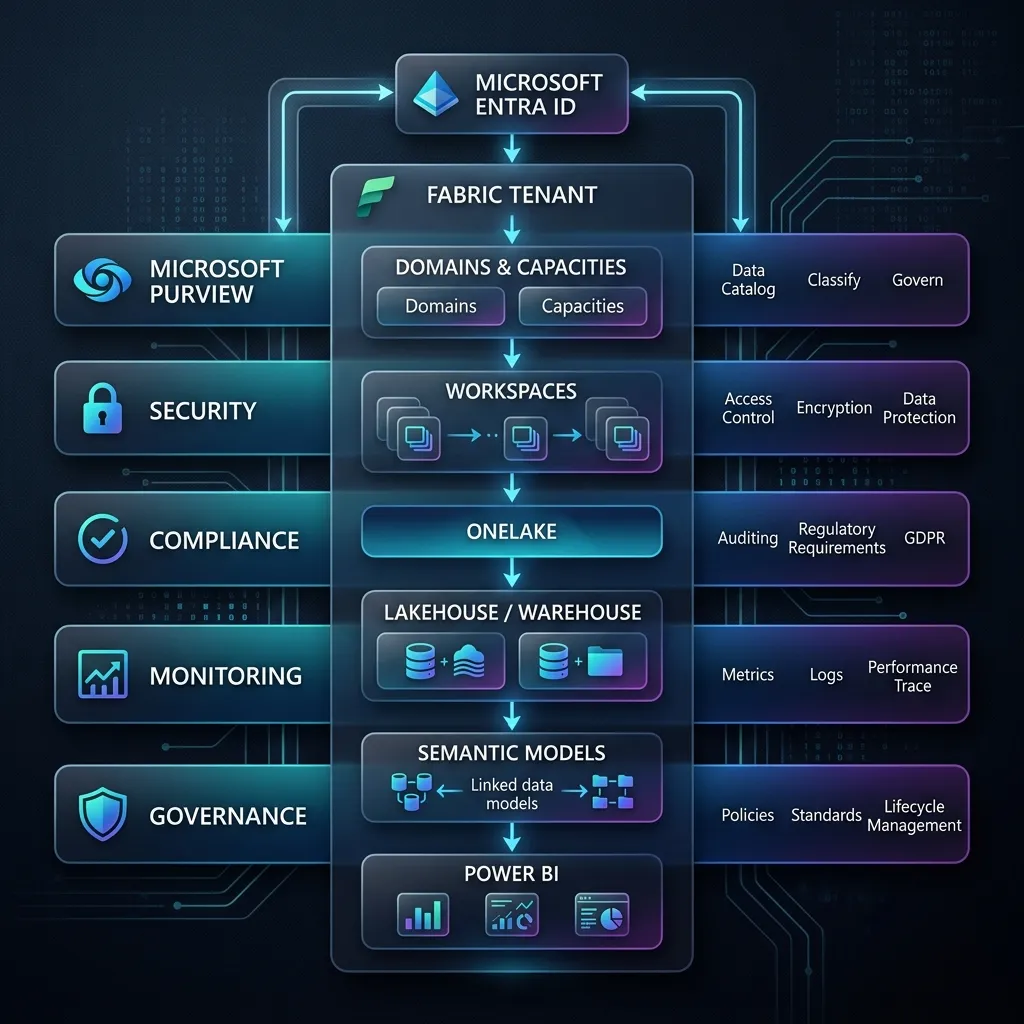
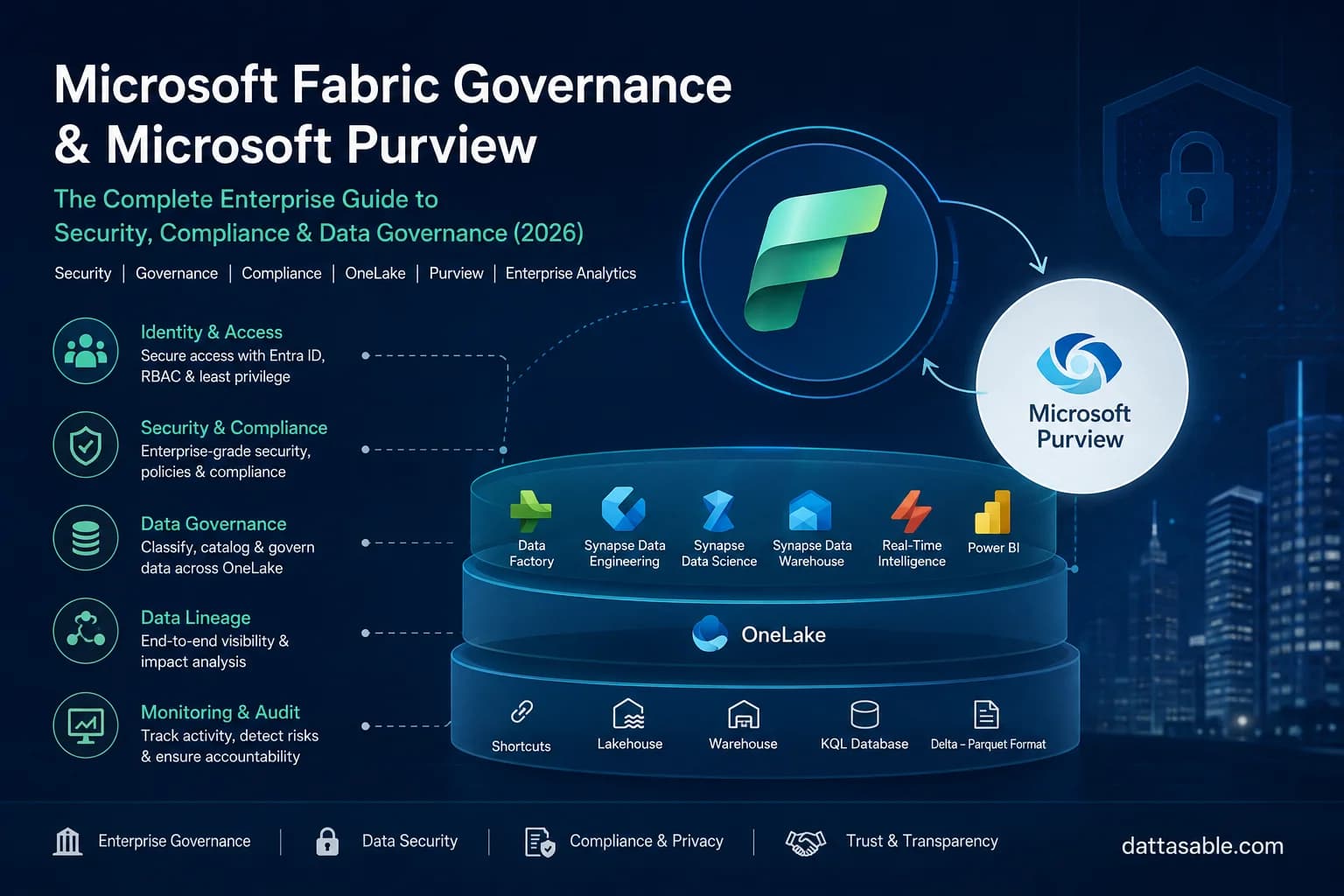
Governance is an architectural system, not just a collection of admin toggle switches. To govern Microsoft Fabric effectively, you must understand how its components layer together.
The Enterprise Architecture Flow
The governance architecture flows hierarchically. Understanding this hierarchy is critical for designing least-privilege access and assigning ownership.
- Microsoft Entra ID (Identity Layer): Everything begins here. Entra ID manages user identities, service principals, managed identities, and Security Groups. Governance dictates that permissions should be assigned to Entra Groups, not individuals.
- Fabric Tenant (Global Layer): The highest boundary. Tenant settings control global behaviors—such as who can create capacities, who can publish to the web, and whether users can share data with external organizations.
- Capacities (Compute Layer): Capacities represent the billing and compute boundaries. Governance at this layer involves deciding which business units pay for which compute resources and monitoring for noisy-neighbor problems.
- Domains (Organizational Layer): Domains are logical groupings of workspaces. They allow organizations to map Fabric to their business structure (e.g., Finance, HR, Sales). Domains enable federated governance by allowing business units to manage their own workspaces under global standards.
- Workspaces (Collaboration Layer): The fundamental security and collaboration boundary. A workspace holds items (Lakehouses, Warehouses, Notebooks, Reports). Governance here defines naming conventions, environment types (Dev/Test/Prod), and workspace roles (Admin, Member, Contributor, Viewer).
- OneLake (Storage Layer): The unified data lake backing all workspaces. Governance involves managing data sharing, shortcuts (pointers to other data sources without copying), and OneLake data access roles.
- Data Workloads (Compute Engines): Synapse Spark, Synapse SQL, and Data Factory pipelines. Governance includes restricting who can execute code or drop tables.
- Semantic Models (Business Logic Layer): The layer where Row-Level Security (RLS) and Object-Level Security (OLS) are typically enforced for BI consumption.
- Reports (Presentation Layer): The final dashboards and paginated reports exposed to end users.
Visualizing the Architecture
(Placeholder for Diagram 1: Microsoft Fabric Enterprise Governance Architecture)
* Title: Microsoft Fabric Enterprise Governance Architecture
* Alt text: Microsoft Fabric enterprise governance architecture showing Entra ID, Fabric workspaces, OneLake, workloads, Microsoft Purview, security and monitoring.
* Recommended filename: microsoft-fabric-enterprise-governance-architecture.webp
* Placement: Below the 'Visualizing the Architecture' sub-heading.
* Purpose: To visually communicate how governance controls span the entire stack from Entra ID down to the Semantic Model, all monitored by Microsoft Purview.
Before designing governance controls, it is useful to understand how Fabric's underlying architecture brings OneLake, workloads, semantic models, and Power BI together. Our Microsoft Fabric architecture guide provides that foundation.
Section 3 — Microsoft Fabric and Microsoft Purview: How They Work Together
Microsoft capability: Fabric provides the underlying platform capabilities described below; organizations should adapt the governance operating model to their own security, compliance, and organizational requirements. For official documentation, see Microsoft Fabric Governance and Microsoft Purview.
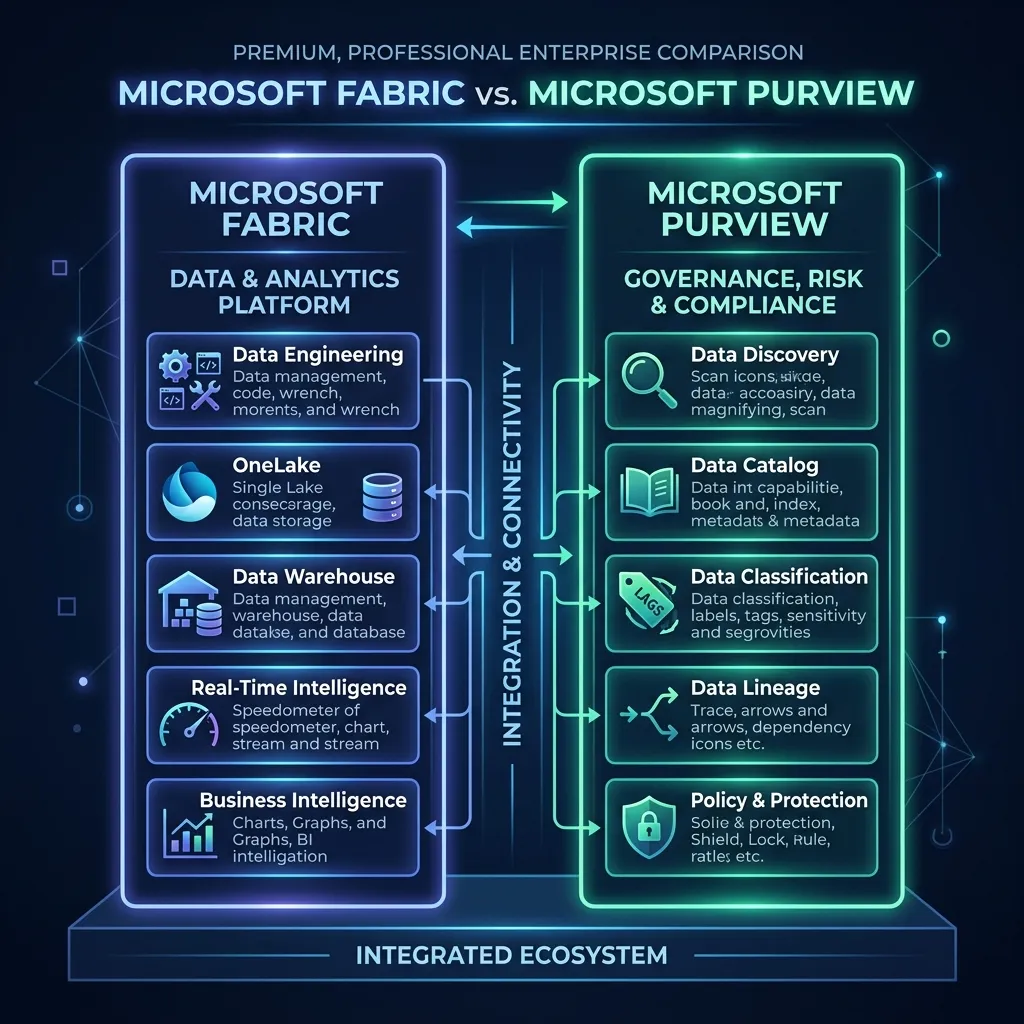
A frequent source of confusion in enterprise deployments is the relationship between Fabric and Purview. To be explicitly clear: Fabric is not Purview, and Purview is not Fabric.
Microsoft Fabric is the data platform where engineering, analytics, and reporting happen. It has its own built-in, platform-level governance features (like workspace roles, tenant settings, and endorsement badges).
Microsoft Purview is Microsoft’s enterprise-wide data security, data governance, and risk management solution. Purview operates above Fabric (and spans across Azure, Microsoft 365, AWS, and multicloud environments).
When you govern Microsoft Fabric, you use a combination of Fabric’s internal controls and Purview’s enterprise capabilities.
The Synergistic Relationship
Fabric integrates natively with Purview. You do not need to build complex scanners to catalog Fabric data; it happens automatically. Purview provides the unified catalog where a data steward can discover a Fabric Lakehouse table alongside an on-premises SQL Server database and a Power BI report.
Purview also powers Information Protection in Fabric. When you apply a sensitivity label (e.g., "Highly Confidential") to a Fabric semantic model, that label is defined and managed in Purview, but enforced inside Fabric.
Comparing Capabilities
| Capability | Microsoft Fabric | Microsoft Purview |
|---|---|---|
| Data Workloads | Yes | No |
| Analytics & BI | Yes | No |
| OneLake | Yes | No |
| Data Discovery | Yes / integrated experiences | Yes |
| Governance | Platform-level controls | Enterprise governance |
| Catalog | Integrated experiences | Enterprise catalog capabilities |
| Lineage | Workload-specific capabilities | Governance and discovery |
| Compliance | Platform controls | Governance/compliance capabilities |
Organizations evaluating Microsoft Fabric must realize that while Fabric provides the execution engine, Purview provides the enterprise oversight. For a robust architecture, you need both.
Section 4 — OneLake Governance
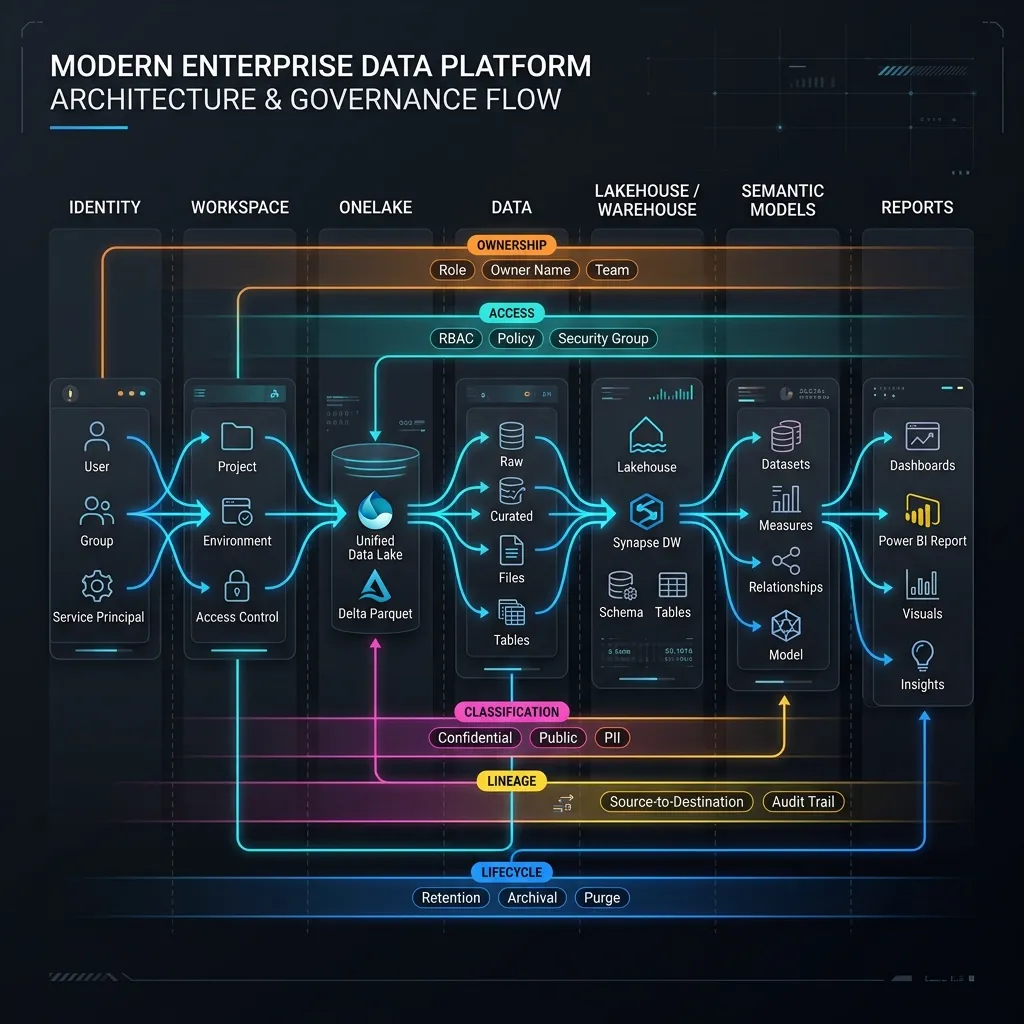
OneLake represents a paradigm shift in how organizations handle data storage. By centralizing storage architecture into a single SaaS data lake, Fabric removes the need to provision, network, and secure dozens of isolated Azure Data Lake Gen2 storage accounts.
However, we must reiterate a crucial insight:
OneLake centralizes storage architecture, but governance still needs logical boundaries.
If you treat OneLake as a single massive folder where everyone can read and write anything, you will quickly create a data swamp.
Establishing Boundaries in OneLake
OneLake is governed through the Fabric workspace hierarchy. The workspace is the primary security boundary for OneLake data. When a Data Engineer creates a Lakehouse in the Finance-PRD-Analytics workspace, the underlying OneLake folders inherit the access controls defined by that workspace.
Ownership and Data Sharing: Instead of copying data to share it between teams, Fabric relies on OneLake Shortcuts. A shortcut is a symbolic link. If the Marketing team needs access to customer data owned by the Sales team, Marketing does not build a pipeline to copy the data. Instead, they create a shortcut in their workspace pointing to the Sales workspace.
This introduces a governance challenge: Who owns the data? The Sales team remains the data owner. The Marketing team is a consumer. If Sales alters the schema of the underlying table, it impacts Marketing. Therefore, OneLake governance requires strict change management processes and clear definitions of Data Contracts between domains.
Access Control in OneLake: Traditionally, you secured a Lakehouse via the SQL analytics endpoint or semantic models. Now, with OneLake Data Access Roles (currently expanding in capabilities), you can define RBAC policies directly at the OneLake folder/table level. This ensures that even if a user accesses the data via a Spark Notebook rather than SQL, the security policies remain intact.
For a deeper understanding of how data is stored and organized in this unified layer, review our OneLake architecture guide.
Section 5 — Fabric Workspace Governance
Workspaces are the fundamental organizational units within Microsoft Fabric. An enterprise workspace strategy dictates how these boundaries are drawn. If every data engineer and BI developer can spin up workspaces at will, you end up with hundreds of untracked assets, orphaned data, and a chaotic permissions model.
Workspace Ownership and Creation Policies
A common enterprise mistake is allowing all users to create workspaces. Instead, workspace creation should be restricted to a centralized Fabric Platform Team or designated Domain Administrators via the Fabric Admin portal.
When a workspace is provisioned, it must have clear ownership. Every workspace must have at least two Workspace Admins (preferably a Security Group) to ensure continuity if a team member leaves. Workspaces without active owners—often referred to as "orphaned workspaces"—become significant security risks and capacity drains over time.
Organizing Workspaces
Workspaces should be organized around business domains and workloads, strictly separating environments.
Development vs. Production: Never mix development assets and production assets in the same workspace. Fabric workspaces should be mapped to specific environments in your deployment pipeline. * Dev Workspace: Where engineers build pipelines and models. Permissions are relaxed. * Test Workspace: Where business users validate data. Permissions are restricted to testers. * Prod Workspace: Where the final data products live. Strictly governed, with no direct developer access.
A Practical Naming Convention:
A standard naming policy makes auditing and capacity management dramatically easier. Consider a format like:
<Domain>-<Environment>-<Workload>
Example: Finance-PRD-Analytics
Organizations should adapt this naming convention to their own operating model rather than blindly copying the example. If your organization is heavily divided by region, a convention like <Region>-<Domain>-<Environment> (e.g., EMEA-Finance-PRD) may be more appropriate.
Workspace Sprawl and Lifecycle Management
Workspace sprawl happens when short-term projects leave behind permanent, unused workspaces. Implement a workspace lifecycle policy that requires regular access reviews. The Fabric Platform Team should actively monitor for inactive workspaces (e.g., no queries or pipeline runs in 90 days) and archive or delete them to free up OneLake storage and reduce audit scope.
Section 6 — Domains and Organizational Governance
While workspaces organize individual projects, Domains organize workspaces at the enterprise level. Domains allow you to group multiple workspaces under a single business unit or functional area.
Examples of practical domains include: * Finance * Sales * Operations * HR * Risk * Customer Analytics
Domains are the linchpin of federated governance. By assigning a Domain Administrator to the "Finance" domain, the central IT team delegates the day-to-day management of Finance workspaces to the Finance data team, while still enforcing global tenant settings.
Governance Operating Models
When designing your domain architecture, you must choose a governance model.
Centralized Governance
In a fully centralized model, a single central IT or Data Platform team builds, deploys, and manages all workspaces and data assets across the enterprise. * Advantages: High consistency, strong control, and easier policy management. * Disadvantages: Slower delivery times, business bottlenecks, and a disconnect from the actual business domain context.
Federated Governance (Data Mesh Approach)
In a federated model, individual business units (domains) own their end-to-end data products. The Finance team manages its own ingestion, Lakehouses, and reports. * Advantages: Domain ownership, faster delivery, and tight business alignment. * Disadvantages: Requires strict standards and strong platform governance to prevent data silos and inconsistent architectures.
The Pragmatic Hybrid Model
For most enterprise Microsoft Fabric deployments, a hybrid model is recommended. The central Fabric Platform Team provisions capacities, manages the tenant settings, establishes security standards, and creates domains. The Domain teams operate within those domains, building data products and managing workspace access according to the central standards. This approach balances agility with security.
Section 7 — Microsoft Fabric RBAC and Access Control
Microsoft capability: Refer to the official Workspace Roles documentation for the definitive list of permissions.
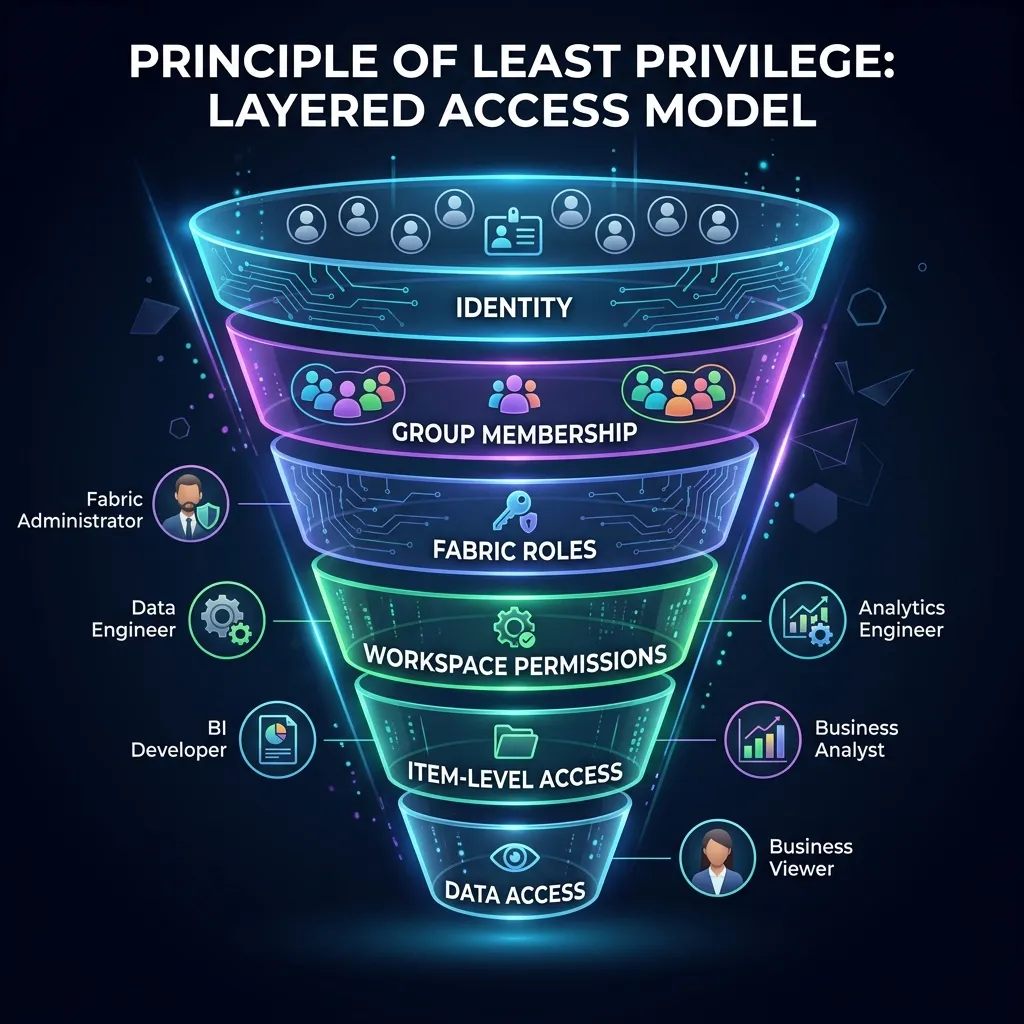
Access control in Microsoft Fabric is a layered security model. Unlike traditional SQL Server deployments where a DBA managed permissions locally, Fabric access is entirely tied to Microsoft Entra ID.
The Permission Hierarchy
- Fabric Roles (Tenant Level): Fabric Administrator (manages tenant settings) and Capacity Administrator (manages compute resources).
- Workspace Roles: The primary RBAC mechanism for data developers.
- Admin: Can manage the workspace, users, and all items.
- Member: Can add/remove items and share items.
- Contributor: Can create and edit items (the standard role for developers).
- Viewer: Can view items but cannot modify them.
- Item Permissions: Sharing specific reports or semantic models with end-users without giving them access to the entire workspace.
- Data-Level Security: Row-Level Security (RLS) and Object-Level Security (OLS) applied within the SQL Analytics endpoint or the Semantic Model.
The Golden Rule of Fabric Permissions
Never assign permissions to individual users.
If you assign John, Sarah, and Mike direct Viewer access to a workspace, and Sarah moves to a new department, someone must manually remove her access. At enterprise scale, this leads to privilege creep.
Instead, map Fabric Workspace roles to Microsoft Entra ID Security Groups.
* Create a group: SG_Fabric_Finance_PRD_Viewers
* Assign this group the Viewer role in the Finance-PRD-Analytics workspace.
* Manage group membership via Entra ID lifecycle management or IT service requests.
When applicable, use Service Principals or Managed Identities to execute automated pipelines or REST API calls, ensuring that automated processes do not rely on individual user credentials that might expire or be revoked.
Section 8 — One Person, One Role? No: Designing Least-Privilege Access
A critical governance concept is the principle of least privilege: users and service principals should have the absolute minimum access necessary to perform their jobs.
In a Fabric environment, least privilege requires separation of duties.
- Administrator Access: Fabric Admins should not automatically have access to all data in all workspaces. They manage the platform configuration, not the business data.
- Developer Access: Data Engineers and BI Developers should have Contributor access to Development workspaces. They should not have Contributor access to Production workspaces.
- Analyst Access: Business analysts who need to query Lakehouses or Warehouses using SQL should be granted Read access to specific items, or Viewer access to the workspace, combined with SQL permissions.
- Business User Access: End consumers who only look at Power BI reports should be granted access via Fabric Apps, entirely insulating them from the workspace environment.
Managing Production Restrictions
A common mistake is allowing developers to manually deploy changes to production workspaces. This violates least privilege and breaks auditability. Production deployments should be executed by deployment pipelines or CI/CD processes (via Service Principals), removing the need for developers to have write access to production data.
For emergency fixes ("break-glass" scenarios), implement temporary, time-bound elevated access (e.g., using Entra Privileged Identity Management) rather than leaving permanent admin rights active.
Section 9 — Data Lineage and Impact Analysis
When data is centralized, understanding how it flows becomes critical for compliance, incident response, and change management. Data lineage provides a map of your data's journey.
Example Lineage Flow: Source (On-Premises SQL) → Data Pipeline → Lakehouse (Bronze) → Spark Notebook → Lakehouse (Silver) → Warehouse (Gold) → Semantic Model → Power BI Report → Executive Dashboard.
Why Lineage Matters
If a Data Engineer needs to drop a column in the Silver Lakehouse, how do they know which downstream executive dashboards will break? Fabric’s built-in lineage view allows teams to perform impact analysis before making changes.
From a governance perspective, lineage is essential for: * Incident Response: When a report shows incorrect numbers, lineage helps trace the error back to the specific pipeline or source system. * Audits: Demonstrating to auditors exactly how sensitive financial data moves through the architecture. * Documentation: Automatically mapping dependencies without relying on static architecture diagrams.
While Fabric provides excellent workload-level lineage (showing how a Lakehouse connects to a Semantic Model), Microsoft Purview expands this capability. Purview can trace lineage all the way back to the operational source systems (like SAP or Salesforce) outside of Fabric, providing true enterprise-to-end data lineage.
Section 10 — Data Classification and Sensitivity
Microsoft capability: Sensitivity labels from Microsoft Purview extend automatically to Fabric. Review the official sensitivity label documentation for implementation details.
Not all data is equal. A table containing public website traffic requires different governance than a table containing employee social security numbers.
Establishing a Classification Model
Before implementing technical controls, the Data Governance team must establish a classification taxonomy. A standard enterprise model includes: * Public: Data approved for external release. * Internal: Standard business data; unauthorized disclosure causes minimal risk. * Confidential: Sensitive business data (e.g., financial forecasts); unauthorized disclosure causes moderate risk. * Highly Confidential: Strictly regulated data (e.g., PII, PHI, PCI); unauthorized disclosure causes severe financial or legal damage.
Applying Classification in Fabric
This is where Microsoft Purview’s integration shines. In Fabric, you can apply Sensitivity Labels (managed by Purview Information Protection) to workspaces, lakehouses, semantic models, and reports.
When a BI Developer exports data from a "Highly Confidential" Power BI report to Excel, that sensitivity label travels with the Excel file. If your Purview policies restrict highly confidential files from being emailed outside the organization, the user will be blocked from sending that Excel file. This ensures that Fabric governance extends beyond the boundaries of the SaaS platform and protects the data wherever it goes.
Section 11 — Microsoft Fabric Security Architecture
To govern effectively, you must treat security as defense in depth. If one layer fails or is misconfigured, the underlying layers should still protect the data. A robust Microsoft Fabric security architecture consists of eight distinct layers.
Layer 1: Identity (Microsoft Entra ID)
The foundation. This layer verifies who is attempting to access the platform. Controls include Multi-Factor Authentication (MFA), Conditional Access policies (e.g., blocking logins from risky IP addresses), and Identity Protection.
Layer 2: Tenant (Fabric Admin Portal)
The global perimeter. This layer controls what capabilities are allowed. For example, disabling the ability for users to share reports with external guest accounts or restricting who can export data to Excel.
Layer 3: Capacity
The compute boundary. Securing capacity involves ensuring that only authorized Domain Admins can attach workspaces to premium capacities, preventing unauthorized workloads from consuming expensive compute resources.
Layer 4: Workspace
The collaboration boundary. This layer determines who can build and view assets. By strictly managing Workspace Admins, Members, Contributors, and Viewers via Entra Groups, you protect the items inside.
Layer 5: Data (Workloads & Semantic Models)
The data boundary. This includes OneLake data access roles, SQL endpoint permissions (GRANT SELECT), and Row-Level Security (RLS) inside semantic models. This layer ensures that even if a user has access to a workspace, they only see the specific rows of data they are authorized to view.
Layer 6: Network
The network boundary. By default, Fabric is a multi-tenant SaaS service accessible over the public internet. For high-security environments, you can implement Private Endpoints and Private Links to ensure that traffic between your on-premises network (or Azure VNet) and Fabric never traverses the public internet.
Layer 7: Monitoring
The audit layer. Continuous monitoring of the Fabric Audit Log, Microsoft 365 Defender, and Log Analytics ensures that security teams can detect anomalous behavior.
Layer 8: Governance (Microsoft Purview)
The oversight layer. Applying sensitivity labels and Data Loss Prevention (DLP) policies to ensure that even if a user legitimately accesses data, they cannot improperly exfiltrate it.
Section 12 — Zero Trust and Microsoft Fabric
Zero Trust is a security framework based on three principles: Verify explicitly, Use least privilege access, and Assume breach.
A common enterprise misconception is that adopting a Microsoft SaaS product automatically makes your architecture "Zero Trust." Fabric is not automatically Zero Trust. It provides the tools to build a Zero Trust architecture, but the organization must configure the controls.
- Verify Explicitly: Entra ID Conditional Access must be configured to verify the user's identity, device health, and location before granting access to Fabric.
- Least Privilege: Workspace roles and Row-Level Security must be actively designed to limit access, as discussed in Section 8.
- Assume Breach: If an attacker compromises a BI Developer's account, how far can they go? Network isolation (Private Endpoints), strict workspace boundaries, and active monitoring limit the blast radius of a breach.
For a deeper dive into securing the network layer of Fabric, review our architectural guidance on configuring Private Endpoints.
Section 13 — Development, Test and Production Governance
flowchart LR
    A[Development] -->|Git / Source Control| B[Testing]
    B -->|Deployment Pipelines| C[Production]

    subgraph Dev Workspace
    A
    end

    subgraph Test Workspace
    B
    end

    subgraph Prod Workspace
    C
    end

    D((Approval Gate)) -.->|Code Review| B
    E((Monitoring)) -.->|Governance| C
Governance breaks down when organizations treat Microsoft Fabric like a personal Excel file, editing production data directly. A governed enterprise environment strictly separates environments:
Development → Test → Production
Implementing the Governance Flow
- Development: This is the sandbox. Data Engineers and Analytics Engineers connect their Dev workspace to a Git repository (Azure DevOps or GitHub). Changes to Notebooks, Lakehouses, and Semantic Models are committed to source control.
- Test/UAT: Code is promoted from Dev to Test using Fabric Deployment Pipelines. Here, changes are validated against a copy of production data (or a masked subset). Business users perform User Acceptance Testing (UAT).
- Production: Once approved, the Fabric Deployment Pipeline promotes the changes to the Production workspace.
The Governance Gates
The key governance control here is approval routing. Developers should not have the ability to click "Deploy to Production." Instead, promoting code from Test to Production should require a pull request review by a senior architect, and the actual deployment should ideally be handled by a Service Principal running an automated CI/CD pipeline.
This process ensures that no unreviewed, unapproved code runs against production data, and if a pipeline fails, there is a documented rollback plan via Git history.
Section 14 — Fabric Governance Monitoring and Auditing
A governance policy is useless if you cannot verify that people are following it. Continuous monitoring is the engine of operational governance.
Fabric generates extensive audit logs that are recorded in the Microsoft 365 Unified Audit Log. These logs capture almost every activity: who created a workspace, who viewed a report, who exported data, and who changed a tenant setting.
Key Governance KPIs to Monitor
The Data Governance team should actively monitor specific Key Performance Indicators (KPIs) to identify risks before they become incidents:
- Orphaned Workspaces: Workspaces where all Admins have left the company.
- Inactive Users: Users with Fabric licenses who haven't logged in for 90 days (reclaim the license).
- Excessive Permissions: Users who have been granted direct Admin access instead of group-based access.
- Stale Reports and Unused Semantic Models: Assets that consume capacity memory but have zero views in the last 60 days. (Archive them).
- Failed Refreshes: Pipelines or models that consistently fail, indicating technical debt or broken data contracts.
- Unclassified Data: Sensitive workspaces or models lacking a Purview sensitivity label.
Monitoring these KPIs requires extracting the Fabric Admin APIs and Audit Logs into a central monitoring Lakehouse to build a "Governance Dashboard."
Section 15 — Fabric Governance Operating Model
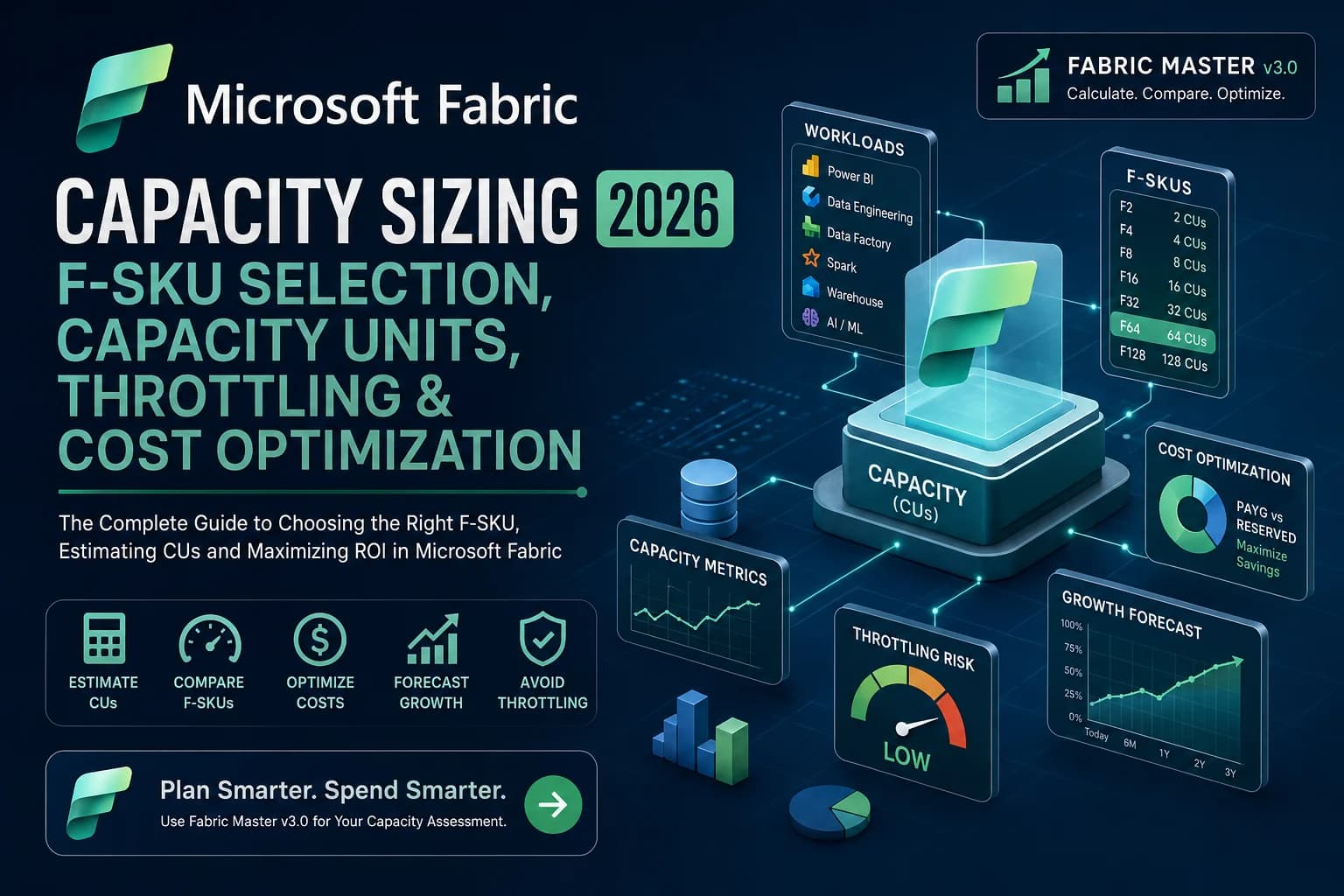
Governance also extends beyond permissions and data protection. Enterprise teams need clear ownership of capacity consumption, workload allocation, and cost accountability. For organizations sizing Fabric workloads, the Fabric Capacity Calculator can be used alongside the governance model to establish capacity ownership and planning assumptions.
To operationalize governance, you must define who does what. This is where a highly practical RACI (Responsible, Accountable, Consulted, Informed) model is essential.
Enterprise Governance RACI
| Task / Responsibility | Fabric Platform Team | Data Governance Team | Security Team | Domain Admins | Data Engineers / BI Devs |
|---|---|---|---|---|---|
| Manage Tenant Settings | R, A | C | C | I | I |
| Define Classification Taxonomy | I | R, A | C | I | I |
| Create Workspaces | R | I | I | R | I |
| Assign Workspace Access (via Groups) | I | I | I | R, A | I |
| Develop Data Pipelines & Reports | I | I | I | A | R |
| Approve Prod Deployments | C | I | I | R, A | I |
| Monitor Audit Logs for Anomalies | R | I | R, A | I | I |
| Archive Inactive Workspaces | R, A | C | I | C | I |
Note: R = Responsible (does the work), A = Accountable (owns the result), C = Consulted (provides input), I = Informed (kept in the loop).
This operating model ensures that the Platform Team handles the infrastructure, the Governance Team handles the policies, and the Domains handle the actual data products.
Section 16 — Enterprise Fabric Governance Policy
Instead of writing a 100-page governance manual that no one reads, enterprises should establish a concise, practical policy framework.
A practical Fabric Governance Policy should dictate:
- Workspace Policy: All workspaces must be assigned to a Domain and have a minimum of two active Admins.
- Naming Policy: All assets and workspaces must follow the standard naming convention (e.g.,
Domain-Environment-Workload). - Access Policy: Individual user permissions are strictly prohibited. All access must be managed via Entra ID Security Groups.
- Data Classification Policy: All semantic models and lakehouses containing PII must be labeled in Purview as "Highly Confidential."
- Production Deployment Policy: Direct edits to Production workspaces are prohibited. All changes must flow through Git and Fabric Deployment Pipelines.
- Retention Policy: Data in raw zones is retained for 30 days. Aggregated gold data is retained for 7 years.
- Access Review Policy: Domain Admins must review workspace access groups quarterly.
- Incident Response Policy: Any unauthorized export of Highly Confidential data triggers an immediate alert to the Security Operations Center (SOC).
Make these recommendations practical. A policy that developers can easily follow is infinitely more secure than a perfect policy that developers actively bypass.
Section 17 — Common Microsoft Fabric Governance Mistakes
Even with a solid architecture, organizations frequently stumble during execution. Here are the most common Fabric governance mistakes and how to avoid them.
1. Giving everyone Workspace Admin access * Problem: Developers demand Admin access because "things are breaking." * Why it happens: Misunderstanding of Fabric roles; the Contributor role is usually sufficient for development. * Consequence: Privilege creep and accidental deletion of assets. * Better approach: Enforce the Contributor role via groups for developers.
2. Treating OneLake as automatically governed * Problem: Assuming that because data is in OneLake, it is secure. * Why it happens: Confusion between storage unification and security unification. * Consequence: Unauthorized access to sensitive raw files. * Better approach: Use workspaces as security boundaries and implement OneLake data access roles.
3. Ignoring Lineage * Problem: Changing a source table without checking dependencies. * Why it happens: Rushing deployments. * Consequence: Broken executive dashboards and loss of trust. * Better approach: Mandate impact analysis using Fabric’s lineage view before any schema changes.
4. No Production Separation * Problem: Building and reporting out of a single workspace. * Why it happens: It’s faster in the short term. * Consequence: Users see incomplete data, and developers accidentally break reports. * Better approach: Strict Dev/Test/Prod separation using deployment pipelines.
5. Treating Purview as a Magic Governance Button * Problem: Buying Purview and assuming governance is "done." * Why it happens: Viewing governance as a software problem rather than a process problem. * Consequence: An expensive tool that catalogs garbage data. * Better approach: Establish ownership and classification policies before configuring Purview.
6. Over-engineering governance for small teams * Problem: Creating a 10-layer approval process for a 3-person BI team. * Why it happens: Copying enterprise frameworks without context. * Consequence: The team bypasses the process completely. * Better approach: Scale governance controls to match organizational risk and size.
Section 18 — Centralized vs Federated vs Hybrid Governance
How should your organization manage Fabric? Provide a decision framework based on your organizational structure.
Centralized Governance
The central IT team manages everything. * Best for: Highly regulated industries (banking, defense), small organizations, or teams with low data maturity. * The Trade-off: Maximum security, minimal agility.
Federated Governance
Business units (Finance, HR) operate autonomously. * Best for: Massive enterprises with highly capable decentralized engineering teams. * The Trade-off: Maximum agility, high risk of inconsistent architecture and data silos.
Hybrid Governance
Central IT manages the platform, capacities, and standards. Domains manage the data products. * Best for: Most modern enterprises. It allows the Finance team to build Finance reports quickly, provided they follow the central naming, security, and Git-integration standards. * The Trade-off: Requires a strong Data Governance council to maintain alignment between IT and the business domains.
I strongly recommend the Hybrid model for Microsoft Fabric. It leverages Fabric's Domain feature perfectly, allowing central oversight with distributed execution.
Section 19 — Real-World Enterprise Scenario
Note: The following is a fictional reference architecture designed to illustrate governance concepts.
The Scenario: A global financial services organization is adopting Fabric. They have five major units: Finance, Sales, Operations, Risk, and Customer Analytics.
The Implementation:
1. Domains: The Platform Team creates five Fabric Domains corresponding to the business units.
2. Workspaces: Within the "Risk" Domain, they create three workspaces: Risk-DEV, Risk-TEST, and Risk-PRD.
3. Ownership: The Chief Risk Officer is designated as the Data Owner. The Risk Data Engineering lead is the Workspace Admin (via an Entra Group).
4. Access: Business analysts in the Risk department are added to an Entra group SG_Risk_Analysts. This group is granted Viewer access to the Risk-PRD workspace and Read access to the specific SQL endpoint.
5. Purview Integration: The Governance Team configures Purview to automatically scan the Risk-PRD workspaces. Any table containing customer credit scores is tagged "Highly Confidential," which triggers a DLP policy preventing the data from being exported to unmanaged devices.
6. OneLake: The Customer Analytics team needs credit risk scores. Instead of copying the data, the Risk team provisions a OneLake shortcut for Customer Analytics, ensuring that Risk maintains absolute control over the single source of truth.
Section 20 — Microsoft Fabric Governance Implementation Roadmap
Do not attempt to implement every governance control on day one. A phased approach ensures adoption without halting business velocity.
Phase 1 — Foundation
- Establish Microsoft Entra ID security groups.
- Define workspace naming conventions.
- Assign workspace creation rights to a central team.
- Define initial Domains.
Phase 2 — Security
- Implement Dev/Test/Prod workspace separation.
- Design standard RBAC matrices (Admin, Contributor, Viewer).
- Conduct initial access reviews.
Phase 3 — Data Governance
- Integrate Microsoft Purview.
- Define the data classification taxonomy.
- Apply sensitivity labels to critical semantic models.
Phase 4 — Operational Governance
- Establish the Fabric Governance Council.
- Implement Deployment Pipelines and Git integration.
- Setup automated monitoring for orphaned workspaces and inactive users.
Phase 5 — Optimization
- Define governance KPIs.
- Automate access provisioning via ServiceNow or similar tools.
- Implement cross-domain data contracts for OneLake sharing.
Section 21 — Fabric Governance Maturity Model
Dattasable recommendation: The following governance model is a practical operating framework rather than an official Microsoft governance standard.
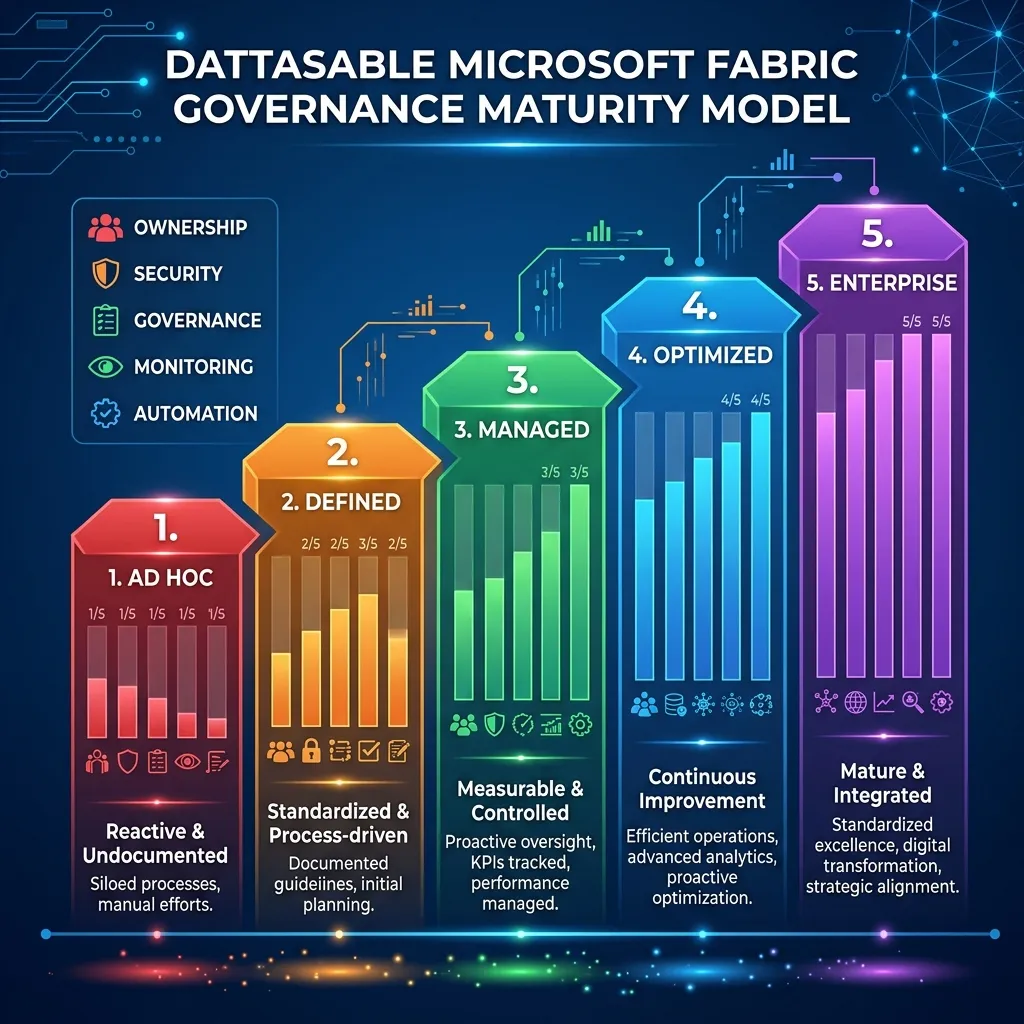
How mature is your organization's Fabric governance? Use this framework to assess your current state.
Level 1 — Ad Hoc
- Everyone can create workspaces.
- Individual permissions are used everywhere.
- No separation of Dev and Prod.
- Risk: High. Next Step: Centralize workspace creation and enforce Entra groups.
Level 2 — Defined
- Naming conventions exist.
- Workspaces have designated owners.
- Basic Dev/Prod separation exists, but deployments are manual.
- Risk: Moderate. Next Step: Implement Deployment pipelines and RBAC standards.
Level 3 — Managed
- Entra Groups control all access.
- Domains are established.
- Microsoft Purview scans are active.
- Risk: Low. Next Step: Enforce sensitivity labels and implement active monitoring.
Level 4 — Optimized
- CI/CD pipelines handle all production deployments.
- Data lineage is actively used for impact analysis.
- Automated alerts trigger on suspicious activity or inactive workspaces.
- Risk: Very Low. Next Step: Move towards automated compliance and capacity chargebacks.
Level 5 — Enterprise
- Fully federated hybrid governance.
- Zero Trust architecture enforced via Private Endpoints.
- Data Contracts govern all cross-domain OneLake sharing.
(Placeholder for Diagram 5: Fabric Governance Maturity Model)
* Title: Fabric Governance Maturity Model
* Alt text: A five-level maturity model from Ad Hoc to Enterprise, showing the progression of Microsoft Fabric governance capabilities.
* Recommended filename: fabric-governance-maturity-model.webp
Section 22 — Microsoft Fabric Governance Checklist
Dattasable recommendation: Use this scannable checklist to audit your enterprise deployment.
| Area | Governance Question | Owner | Status |
|---|---|---|---|
| Identity | Are Fabric users managed through Entra groups? | IAM | ☐ |
| Workspace | Does every production workspace have an owner? | Domain | ☐ |
| Data | Is sensitive data classified? | Data Governance | ☐ |
| Access | Is least privilege enforced? | Security | ☐ |
| Lineage | Can critical data flows be traced? | Data Engineering | ☐ |
| Capacity | Is capacity ownership defined? | Platform | ☐ |
| Deployment | Is production deployment controlled? | Engineering | ☐ |
| Monitoring | Are usage and security monitored? | Platform | ☐ |
Section 23 — FAQ
What is Microsoft Fabric governance? It is the framework of policies, architecture, and processes that dictate how users securely interact with data, compute, and workspaces in Fabric, ensuring trust and compliance.
Does Microsoft Fabric include data governance? Fabric includes platform-level controls (workspace roles, lineage, endorsement), but it relies on Microsoft Purview for enterprise-wide data governance, cataloging, and compliance.
How does Microsoft Purview work with Fabric? Purview sits above Fabric, automatically cataloging its assets, defining enterprise sensitivity labels, and enforcing Information Protection and Data Loss Prevention policies across the Fabric tenant.
Is Microsoft Purview required for Fabric? No, it is not strictly required to run workloads. However, for enterprise deployments handling sensitive data, Purview is highly recommended to achieve regulatory compliance and centralized cataloging.
How do you secure Microsoft Fabric? Security requires defense in depth: Entra ID for identity, workspace roles for collaboration boundaries, OneLake roles and SQL permissions for data access, and Private Endpoints for network isolation.
How does RBAC work in Fabric? Fabric uses Workspace Roles (Admin, Member, Contributor, Viewer) mapped to Microsoft Entra ID groups, combined with item-level sharing and Row-Level Security in semantic models.
How do you govern OneLake? OneLake is governed through workspaces (which act as security boundaries) and OneLake data access roles. Data is shared across boundaries using Shortcuts rather than copying files.
How should development and production environments be separated? They must be placed in entirely separate workspaces. Developers build in the Dev workspace, and code is promoted to the Prod workspace via Deployment Pipelines or Git CI/CD, with no direct developer access to production data.
What are the most common Fabric governance mistakes? Granting everyone workspace Admin rights, failing to separate Dev and Prod, using individual user permissions instead of groups, and assuming that centralization automatically creates governance.