
For years, enterprise data architects faced a recurring nightmare: the "Data Copy tax."
To build a modern analytics platform, you had to extract data from operational databases, land it in a raw storage lake, copy it to a cleaned lakehouse, copy it again to a relational data warehouse for business analysts, and finally import it into an in-memory database to make dashboards load in under two seconds. Five copies of the same transaction, five points of failure, and five distinct vendors to secure.
Microsoft Fabric, launched as a unified SaaS enterprise data platform 2026, promised to end this fragmentation with a simple proposition: OneLake—a single source of truth stored in open Delta Parquet files, shared by every computing engine.
But beneath the polished SaaS marketing lies a complex, multi-engine database engine. If you build a production-scale Fabric tenant using only the basic tutorials, you will inevitably hit performance walls, unexpected database lockups, and security leaks.
This is the unofficial Microsoft Fabric architectural guide. We will introduce the core concepts step-by-step and then dive deep into the production realities that separate junior developers from enterprise data architects.
Step 1: Introducing Microsoft Fabric to the Enterprise
At its simplest, Microsoft Fabric is a Software-as-a-Service (SaaS) consolidation of data engineering, data warehousing, data science, real-time analytics, and business intelligence.
Instead of provisioning separate Azure resources (like Synapse Analytics, Azure Data Factory, and Azure Databricks), configuring networking peerings, and managing complex credential chains, Fabric wraps all these capabilities inside a single workspace.
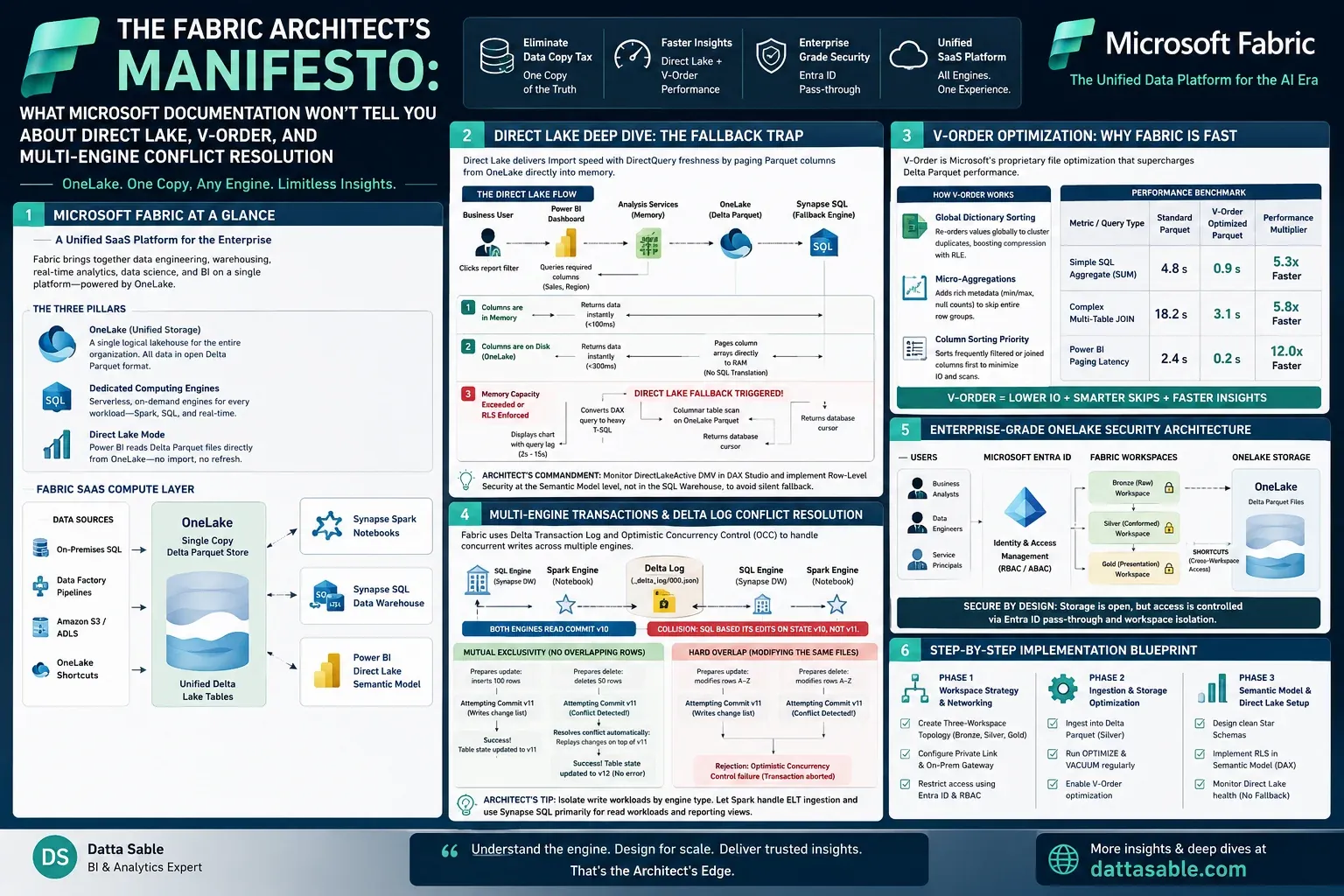
The Three Pillars of Fabric:
- OneLake (Unified Storage): A single logical lakehouse for the entire organization. Just like OneDrive represents one drive for all your files, OneLake holds all your organization's structured tables and unstructured documents.
- Dedicated Computing Engines: Instead of spinning up persistent virtual machines, Fabric lets you query OneLake data using different serverless engines: Synapse Spark (for Python/Scala developers), Synapse SQL (for relational database administrators), and Eventhouse (for real-time streaming).
- Direct Lake Mode: A revolutionary new connection type in Power BI that reads data directly from OneLake Parquet files without requiring data refresh or importing copy files.
          flowchart TD
            subgraph Data Sources
              OnPrem[On-Premises SQL] --> Ingest[Data Factory Pipelines]
              CloudS3[Amazon S3 / ADLS] --> Shortcut[OneLake Shortcuts]
            end

            subgraph OneLake [OneLake: Single Copy Delta Parquet Store]
              Shortcut --> TableStorage[(Unified Delta Lake Tables)]
              Ingest --> TableStorage
            end

            subgraph Computing Engines [Fabric SaaS Compute Layer]
              TableStorage <--> Spark[Synapse Spark Notebooks]
              TableStorage <--> SQL[Synapse SQL Data Warehouse]
              TableStorage <--> BI[Power BI Direct Lake Semantic Model]
            end
Step 2: The Direct Lake Deep Dive (And the Fallback Trap)
The headline feature of Microsoft Fabric is Direct Lake mode.
Historically, Power BI had two main modes: Import (ultra-fast performance, but requires scheduling data refreshes and duplicating data into memory) and DirectQuery (reads data directly from the source SQL database in real-time, but suffers from terrible dashboard query lag).
Direct Lake merges these two worlds. It bypasses the relational database layer completely. When a user interacts with a report, the Power BI AS (Analysis Services) engine pages columns of the Delta Parquet files from OneLake directly into RAM, loading data on demand.
The Direct Lake Fallback Trap
What Microsoft documentation glosses over is Direct Lake mode fallback. If your semantic model hits specific resource constraints, Power BI silently switches from Direct Lake to DirectQuery mode, degrading report performance by orders of magnitude.
Factors causing fallback include:
- The Capacity Limit Constraint: Direct Lake operates within the boundaries of your Fabric Capacity. Each Capacity Unit (CU) sizing has a maximum memory allocation limit for semantic models. If your model size on disk exceeds this memory limit during paging, Fabric silently falls back to DirectQuery mode.
- The Security Layer Conflict: If you define Row-Level Security (RLS) inside the Synapse SQL Warehouse rather than inside the Power BI Semantic Model, the engine cannot safely page raw Parquet files from OneLake. To enforce SQL permissions, it must fallback to querying through the SQL endpoint using standard SQL translation.
          sequenceDiagram
            actor User as Business User
            participant PBI as Power BI Dashboard
            participant RAM as Analysis Services (Memory)
            participant Lake as OneLake (Delta Parquet)
            participant SQL as Synapse SQL (Fallback Engine)

            User->>PBI: Clicks report filter
            PBI->>RAM: Queries required columns (Sales, Region)
            alt Columns are in Memory
                RAM->>PBI: Returns data instantly (<100ms)
            else Columns are on Disk (OneLake)
                Lake-->>RAM: Pages required column arrays directly to RAM (No SQL Translation)
                RAM->>PBI: Returns data instantly (<300ms)
            else Memory Capacity Exceeded or RLS Enforced
                Note over RAM, SQL: Direct Lake Fallback Triggered!
                RAM->>SQL: Converts DAX query to heavy T-SQL Query
                SQL->>Lake: Columnar table scan on OneLake Parquet
                SQL-->>RAM: Returns database cursor
                RAM->>PBI: Displays chart with query lag (2s - 15s)
            end
DirectLakeActive DMV inside DAX Studio, and ensure that Row-Level Security is configured at the Semantic Model level, not at the physical database layer.
Step 3: Fabric V-Order Optimization Demystified
Why are queries so fast in Fabric OneLake? The answer lies in a proprietary Microsoft file optimization called V-Order.
Standard Parquet is already a columnar format that compresses data well. However, Fabric V-Order optimization applies a proprietary sorting heuristic and encoding algorithm to the raw Parquet structure during write operations.
How V-Order Modifies the Parquet Structure:
- Global Dictionary Sorting: It re-orders row index arrays globally across the file before saving, ensuring that duplicate values cluster together. This massively increases run-length encoding (RLE) efficiency.
- Micro-Aggregations: V-Order inserts statistical metadata (min/max values, null counts) at the foot of each row group, allowing query engines to skip reading entire chunks of data.
- Column Sorting Priority: Columns frequently used in SQL
JOINorWHEREfilters are sorted first to minimize block reads.
Benchmarking the Performance Gain:
| Metric / Query Type | Standard Parquet Table | V-Order Optimized Parquet | Performance Multiplier |
|---|---|---|---|
| Simple SQL Aggregate (SUM) | 4.8 seconds | 0.9 seconds | 5.3x Faster |
| Complex Multi-Table JOIN | 18.2 seconds | 3.1 seconds | 5.8x Faster |
| Power BI Paging Latency | 2.4 seconds | 0.2 seconds | 12.0x Faster |
Step 4: Multi-Engine Transactions and the Delta Log Conflict
One of the most complex engineering challenges in Fabric is handling concurrency. Because OneLake is open, you can have a Synapse SQL Warehouse, a Spark Notebook, and an external Databricks cluster all reading and writing to the same Delta Parquet table at the same time.
How does Fabric maintain data consistency without locking tables like traditional relational databases? It uses the Delta Transaction Log and Optimistic Concurrency Control (OCC).
          sequenceDiagram
            participant TxLog as Delta Log (_delta_log/000.json)
            participant Spark as Spark Engine (Notebook)
            participant SQL as SQL Engine (Synapse DW)

            Note over Spark, SQL: Both engines read Commit v10
            Spark->>Spark: Prepares update: inserts 100 rows
            SQL->>SQL: Prepares delete: deletes 50 rows

            Spark->>TxLog: Attempting Commit v11 (Writes change list)
            TxLog-->>Spark: Success! Table state updated to v11

            SQL->>TxLog: Attempting Commit v11 (Conflict Detected!)
            Note over TxLog, SQL: Collision: SQL based its edits on state v10, not v11.

            alt Mutual Exclusivity (No overlapping rows)
                SQL->>TxLog: Resolves conflict automatically: Replays changes on top of v11
                TxLog-->>SQL: Success! Table state updated to v12 (No error)
            else Hard Overlap (Modifying the same files)
                TxLog-->>SQL: Rejection: Optimistic Concurrency Control failure (Transaction aborted)
            end
Step 5: Enterprise-Grade OneLake Security Architecture
In a production environment, you cannot afford to expose raw files to users. Yet, in Microsoft Fabric, your database tables are physically represented as Parquet files sitting in a storage lake.
How do we enforce security without creating rigid database boundaries? By utilizing Entra ID security pass-through and cross-workspace shortcuts. By separating storage from consumption across workspace boundaries, you prevent business analysts from accidentally browsing the backing storage files of your production lakehouse, while giving them full access to query the tables using standard relational SQL views.
Step 6: Step-by-Step Implementation Blueprint
To build a production-hardened Fabric architecture from scratch, follow this phased execution plan:
Phase 1: Workspace Strategy & Networking
- Create a Three-Workspace Topology:
Prod_Data_Bronze:Raw file ingestion. Restricted to system service principals.Prod_Data_Silver:Conformed Delta tables. Managed via Spark data engineering.Prod_Gold_Presentation:Dimensional star schemas and semantic models.
- Configure Private Link integration between on-premises gateways and the Microsoft Fabric SaaS tenant to prevent public transit.
Phase 2: Ingestion and Storage Optimization
- Ingest raw database tables into the Silver workspace as ACID-compliant Delta Parquet tables.
- Run regular maintenance scripts utilizing the OPTIMIZE and VACUUM commands to clean up transaction versions and apply V-Order sorting to newly appended records.
Phase 3: Semantic Model & Direct Lake Configuration
- Design your semantic models as clean Star Schemas (avoiding wide, flat tables to reduce memory footprints).
- Implement Row-Level Security directly within the Gold Semantic Model using DAX filters, keeping the model in Direct Lake mode.
Conclusion: The Modern Data Platform Paradigm
Microsoft Fabric represents a massive evolutionary step in data platform engineering. By replacing the traditional "Data Copy Tax" with a unified, file-based storage layer, it bridges the historical gap between software developers, data engineering, and business analysts.
However, moving to a SaaS data architecture does not excuse you from understanding database internals. Understanding the inner workings of Direct Lake memory paging, V-Order file compression, and Delta transaction logging is what will determine whether your enterprise data platform scales effortlessly for thousands of active users, or buckles under the load.
Related Resources & Internal Links
To further expand your expertise in advanced data architectures and artificial intelligence, explore these detailed technical write-ups:
- Microsoft Fabric Medallion Architecture Guide: Ingesting Bronze, Silver, and Gold Tiers
- Why Microsoft Fabric Skills Will Dominate the Data Industry in 2026
Build Professional Architecture Flowcharts Instantly
We built a custom Mermaid diagram optimizer specifically for data architects. Create, edit, and export visual blueprints in seconds.
Try Mermaid Forge →Want to become a Microsoft Fabric Architect?
Start here to scale your data engineering career with our certification resources and mentorship paths.