
Introduction
In the rapidly evolving landscape of data analytics, manual deployment processes for data platforms are no longer sustainable. They are prone to human error, lead to inconsistent environments, introduce security vulnerabilities, and significantly slow down time-to-market for critical data products. For organizations leveraging Microsoft Fabric—a unified, end-to-end analytics platform—the need for robust Continuous Integration and Continuous Delivery (CI/CD) practices is paramount. Without a mature CI/CD strategy, the promise of Fabric's integrated capabilities can be undermined by operational inefficiencies and unreliable data artifacts.
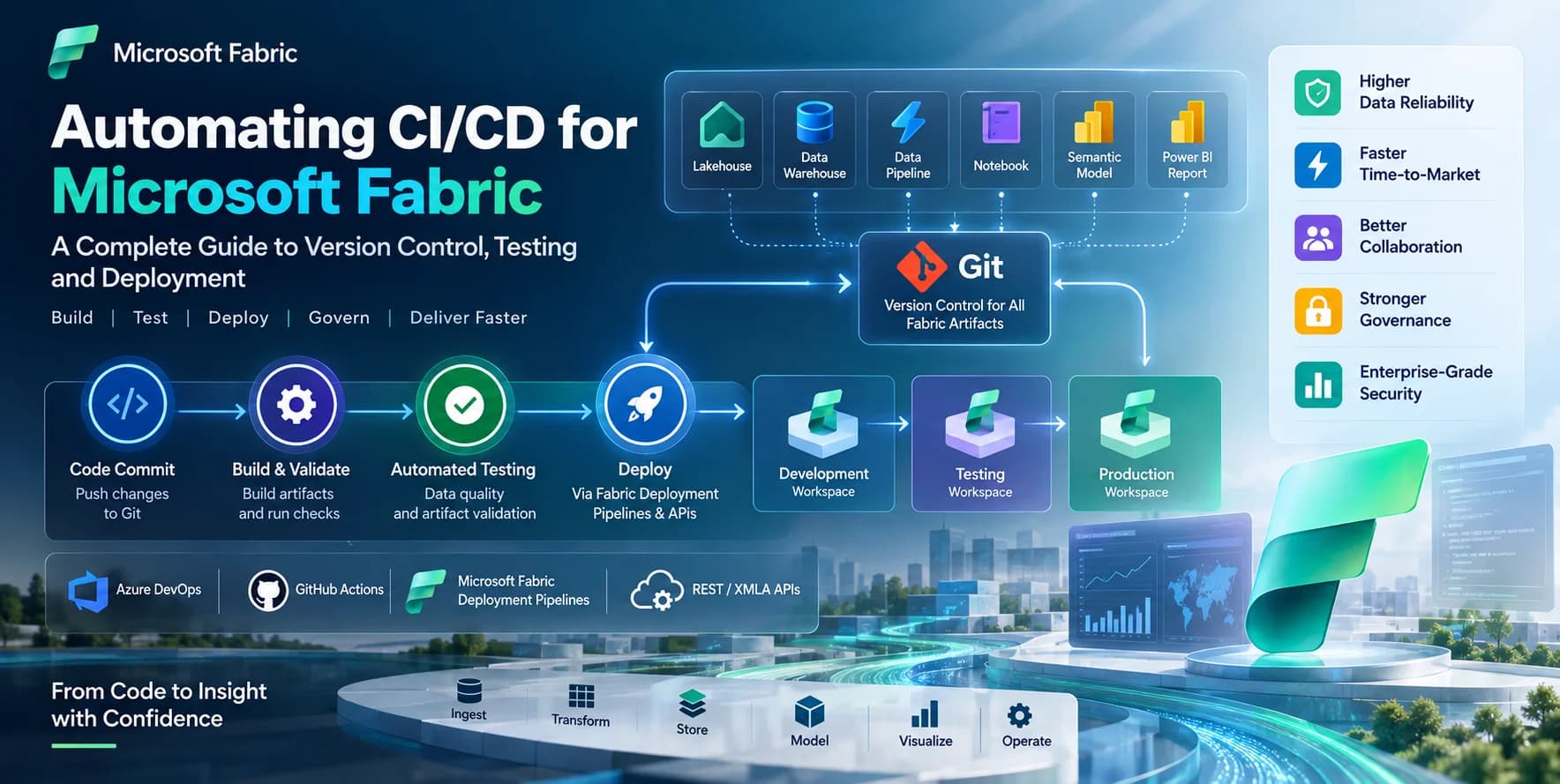
This authoritative guide provides a comprehensive framework for automating CI/CD processes within Microsoft Fabric. We will delve into strategies for version control, automated testing, and seamless deployment across development, testing, and production environments. By adopting these enterprise-grade practices, organizations can achieve greater agility, enhance data reliability, enforce governance, and accelerate the delivery of high-quality data solutions within the Fabric ecosystem.
Key Takeaways
- End-to-End Version Control: Implement comprehensive Git integration for Microsoft Fabric artifacts, including Power BI semantic models, reports, Lakehouses, and notebooks, ensuring traceability and collaboration.
- Automated Quality Assurance: Integrate automated testing frameworks for data quality, transformation logic, and Power BI artifact validation into your CI pipeline to catch issues early.
- Efficient Deployment Automation: Leverage Microsoft Fabric Deployment Pipelines and advanced REST/XMLA APIs, orchestrated by Azure DevOps or GitHub Actions, for reliable and parameterized deployments across environments.
- Robust Environment Management: Establish clear separation and synchronization strategies for Dev, Test, and Prod workspaces, ensuring consistent configurations and controlled promotions.
- Security & Governance by Design: Embed service principals, role-based access control (RBAC), and monitoring into your CI/CD architecture to maintain enterprise-grade security and compliance.
Understanding CI/CD in the Microsoft Fabric Context
Continuous Integration (CI) and Continuous Delivery (CD) are fundamental software engineering practices now indispensable for data platforms. In Microsoft Fabric, CI/CD extends beyond traditional code to encompass data artifacts, infrastructure as code, and configuration management. The goal is to ensure that every change, from a notebook update to a semantic model modification, is automatically built, tested, and deployed reliably.
Why CI/CD is Critical for Data Platforms
Data platforms, particularly those like Microsoft Fabric that integrate data ingestion, transformation, storage, and analytics, present unique CI/CD challenges. The volume, velocity, and variety of data, coupled with the complexity of data models and transformations, amplify the risks associated with manual processes. CI/CD mitigates these risks by:
- Reducing Errors: Automated testing catches bugs and data quality issues early in the development cycle.
- Improving Reliability: Consistent, automated deployments eliminate configuration drift and ensure environment parity.
- Accelerating Delivery: Faster iteration cycles and reduced manual overhead lead to quicker time-to-market for new data products.
- Enhancing Collaboration: Centralized version control fosters team collaboration and provides a clear audit trail of changes.
- Strengthening Governance: Enforcing quality gates, approval workflows, and automated compliance checks.
Core CI/CD Principles for Fabric
Applying CI/CD to Microsoft Fabric requires adherence to several core principles:
- Version Everything: All Fabric artifacts, from code (notebooks, SQL scripts) to definitions (semantic models, lakehouses, data pipelines), must be stored in a version control system like Git.
- Automate Builds: Any change pushed to Git should trigger an automated process to validate the code, run unit tests, and potentially build deployable artifacts.
- Automate Testing: Implement comprehensive tests for data quality, transformation logic, semantic model integrity, and report consistency.
- Automate Deployments: Automatically promote validated artifacts through development, testing, and production environments with minimal human intervention.
- Parameterize Everything: Externalize environment-specific configurations (e.g., connection strings, workspace IDs, data source credentials) to allow deployments to adapt to target environments without code changes.
- Fail Fast: Design pipelines to detect and report failures as early as possible in the CI/CD process.
- Monitor Constantly: Implement monitoring and alerting for both pipeline execution and the performance/health of deployed Fabric solutions.
Key Components of a Fabric CI/CD Pipeline
An enterprise-grade Fabric CI/CD pipeline typically involves the following integrated components:
- Git Repository (Azure Repos/GitHub): Central source of truth for all Fabric artifact definitions.
- Microsoft Fabric Workspaces: Dedicated environments for Development, Testing, and Production.
- Azure DevOps/GitHub Actions: Orchestration engine for CI/CD pipelines, managing build, test, and deployment stages.
- Microsoft Fabric Deployment Pipelines: Built-in service for structured deployment of Power BI and Data Warehouse items across workspaces.
- Microsoft Fabric REST APIs / XMLA Endpoints: Programmatic interfaces for deploying, managing, and configuring Fabric artifacts not fully supported by Deployment Pipelines (e.g., granular notebook deployments, Data Pipelines).
- Service Principals: Azure Active Directory (Azure AD) application identities used by automation agents for secure, non-interactive access to Fabric and Azure resources.
Setting Up Your Microsoft Fabric Development Environment for CI/CD
A robust CI/CD strategy begins with a well-structured development environment. This involves disciplined workspace management, effective Git integration, and secure credential handling.
Workspace Management and Separation
Enterprise deployments necessitate a clear separation of environments to ensure stability and control. The recommended approach for Fabric is to maintain distinct workspaces for each stage:
- Development Workspace: Where developers create and test new features. Changes here are frequently pushed to Git.
- Test Workspace: Used for integration testing, user acceptance testing (UAT), and comprehensive validation. Deployments to this workspace are automated after successful CI builds.
- Production Workspace: Contains the live, validated data solutions consumed by end-users. Deployments to Production are typically triggered after successful testing and approval.
Each workspace should ideally correspond to a distinct git branch (e.g., dev branch for Development, release branch for Test, main branch for Production) to align code changes with environment stages.
Git Integration with Fabric
Microsoft Fabric offers native Git integration, a cornerstone for CI/CD. This allows developers to connect their Fabric workspaces directly to Azure Repos or GitHub, enabling version control for various artifacts.
How Fabric Git Integration Works:
When a Fabric workspace is connected to a Git repository, specific item types are synchronized directly. This includes:
- Lakehouses: Definition, schema, and notebooks within them.
- Notebooks: Individual Python/Scala/R/SQL notebooks.
- Data Pipelines: Definition and configuration.
- Power BI Semantic Models: Model definition (excluding actual data).
- Power BI Reports: Report definition and layout.
- Data Warehouses: Schema definition (DDL).
Connecting a Workspace to Git:
- Navigate to your Fabric workspace settings.
- Select 'Git Integration'.
- Configure your Git repository details (organization, project, repository, branch, folder).
- Optionally, specify a sub-folder to limit the scope of synchronization.
Once connected, Fabric items appear in the repository, and changes pushed from Fabric (or directly to Git) can be synchronized. Developers should work in feature branches, merge into a dev branch, and then promote through release and main branches via pull requests and pipeline automation.
Service Principals and Permissions
Automated pipelines require a non-interactive identity to perform actions within Fabric. This is achieved using an Azure Active Directory (Azure AD) Service Principal.
Steps to Configure a Service Principal:
- Create an Azure AD App Registration:
az account set --subscription "
Grant API Permissions: Assign the Service Principal
Power BI Servicepermissions, specificallyTenant.ReadWrite.Allor more granular permissions if available and sufficient for your operations. For Fabric Admin APIs,Tenant.ReadWrite.Allis often required.Add to Fabric Workspaces: Grant the Service Principal appropriate roles (e.g., 'Contributor' or 'Admin') in your Fabric Dev, Test, and Prod workspaces. This is done via the workspace access settings, similar to how you'd add a user.
Fabric Admin API permissions (e.g., 'Fabric Administrator' role in Power BI Admin Portal) may be needed for tenant-level operations like creating/managing workspaces or deployment pipelines programmatically.
Building the CI Pipeline: Version Control and Automated Testing
The Continuous Integration (CI) stage focuses on ensuring that every code change is integrated frequently, validated, and ready for deployment. This involves disciplined version control and robust automated testing.
Fabric Git Integration Deep Dive
For artifacts that natively support Fabric Git integration (Notebooks, Lakehouses, Power BI artifacts), the workflow is streamlined:
- Developer Workflow: Developers make changes in the Development workspace. They use the 'Git' pane in Fabric to 'Commit' changes (which stages and commits to the connected branch) and 'Update' to pull latest changes from Git.
- Pull Requests (PRs): Changes committed from Fabric are then proposed to the main development branch (e.g.,
dev) via a PR in Azure Repos or GitHub. PRs facilitate code reviews, static analysis, and automated build validations. - Build Validation: A CI pipeline is triggered on PR merges to the
devbranch. This pipeline performs basic validation: linting, syntax checks, and potentially initial unit tests.
Example: Notebook Versioning
When a notebook is connected to Git, its .py or .ipynb file is stored in the repository. A change made in the Fabric notebook editor is reflected in the Git pane, allowing for commit and push operations. The Git repository becomes the single source of truth for the notebook's code.
Strategies for Versioning Non-Git Integrated Artifacts
Not all Fabric artifacts currently have native Git integration. For these, alternative strategies are required:
- KQL Query Sets / KQL Databases: KQL Queries can be exported as
.kqlfiles and versioned in Git. KQL Database definitions (schema) can be generated as DDL scripts and versioned. - Data Warehouses (DWH): While the DWH itself is versioned via Fabric Git Integration, detailed schema changes and stored procedures can be managed as SQL scripts in Git. Tools like
dbatoolsorSqlPackage.execan extract DDL for versioning and deployment. - Data Activator Items: Exported as JSON files and versioned.
- Dataflows (Gen2): The underlying M code for Dataflows can be extracted (e.g., via Fabric APIs or Power Query SDK) and versioned. The deployment would then involve recreating or updating the dataflow via API.
For these artifacts, your CI pipeline would involve scripts that extract their definitions into version-controlled files, and your CD pipeline would use scripts to deploy them.
Automated Testing Frameworks
Automated testing is crucial for ensuring the quality and reliability of your Fabric solutions. Integrate these tests into your CI pipeline to run on every commit or PR merge.
Notebook Unit Testing (Data Engineering):
- Pytest/UnitTest: For Python notebooks, organize testable functions into
.pyfiles and usepytestto run unit tests. For example, test data transformation functions with mock data.
# my_data_transformations.py
def clean_data(df):
    return df.dropna()

# test_data_transformations.py
import pytest
import pandas as pd
from my_data_transformations import clean_data

def test_clean_data():
    df = pd.DataFrame({'A': [1, 2, None], 'B': ['x', None, 'z']})
    cleaned_df = clean_data(df)
    assert cleaned_df.shape == (1, 2)
    assert cleaned_df.iloc[0]['A'] == 1
Your CI pipeline would execute
pytestagainst these test files.- Pytest/UnitTest: For Python notebooks, organize testable functions into
Data Quality Checks (DQ):
- Great Expectations / Deequ: Integrate data quality frameworks to define expectations on your Lakehouse tables or DWH views. These frameworks can validate schema, value ranges, completeness, and consistency.
# Example using Great Expectations in a CI pipeline notebook
from great_expectations.datasource import Datasource
from great_expectations.dataset import SparkDFDataset

# Assuming data is in a Lakehouse table 'my_silver_table'
df = spark.read.format("delta").load("Tables/my_silver_table")
ge_df = SparkDFDataset(df)

# Define and run expectations
ge_df.expect_column_to_exist("customer_id")
ge_df.expect_column_values_to_be_unique("customer_id")
ge_df.expect_column_values_to_not_be_null("order_date")

validation_result = ge_df.validate()
assert validation_result["success"] is True, "Data quality validation failed!"
Power BI Semantic Model Testing:
- Tabular Editor Scripts: Use C# scripts within Tabular Editor (or a deployment tool like
pbi-tools) to automate checks on DAX calculations, measure definitions, and relationships. - DAX.Do / PBI-Tools: These tools can validate DAX queries against semantic models, perform regression tests, and compare model definitions between environments.
- Tabular Editor Scripts: Use C# scripts within Tabular Editor (or a deployment tool like
SQL DWH Testing:
- SQL DB unit test frameworks (e.g., tSQLt, NUnit for SQL): Although native integration isn't yet in Fabric DWH, you can deploy test stored procedures or use external tools to validate data and schema post-deployment.
Implementing the CD Pipeline: From Dev to Production
The Continuous Delivery (CD) stage automates the process of deploying validated artifacts to various environments, culminating in production. This involves leveraging Fabric's native deployment tools and programmatic APIs, combined with external orchestrators.
Microsoft Fabric Deployment Pipelines
Fabric Deployment Pipelines (inheriting from Power BI deployment pipelines) provide a structured way to deploy Power BI and Data Warehouse items across Dev, Test, and Prod workspaces. They enforce a sequential flow, allow comparison of stages, and support rule sets for parameterization.
Key Features:
- Stage-Based Deployment: Define stages (Dev, Test, Prod) and promote content between them.
- Deployment Rules: Configure rules to automatically update connection strings, parameters, and gateway mappings during deployment, essential for environment-specific configurations.
- Deployment History: Track deployments and review details.
- API Integration: Deployment Pipelines can be managed and triggered via REST APIs.
Limitations:
- Primarily focuses on Power BI artifacts and Data Warehouses. Other Fabric items (e.g., KQL databases, Eventhouses, Data Activator items) are not directly supported.
- Requires manual initial setup and configuration of rules within the Fabric UI, though API support for management is evolving.
Best Practices for Deployment Pipelines:
- Configure Deployment Rules meticulously: Ensure all environment-specific differences are handled by rules (e.g., data source changes, parameter values, gateway connections). This eliminates manual post-deployment steps.
- Automate Rule Creation (where possible): For complex scenarios, use the Fabric REST API to manage deployment pipeline rules programmatically.
- Use for Power BI / DWH: Reserve native Fabric Deployment Pipelines for their intended artifacts to maximize their benefits.
Advanced Deployment Strategies with Fabric APIs
For artifacts not natively supported by Deployment Pipelines or for more granular control, Fabric REST APIs and XMLA endpoints are indispensable.
Power BI Semantic Model Deployment (XMLA Endpoint / REST API):
- XMLA Endpoint: For Power BI semantic models (datasets), the XMLA endpoint allows for programmatic deployment and management, similar to Analysis Services. You can use tools like
Tabular Editor(via its command-line interface) or custom scripts (PowerShell withInvoke-ASCmd) to deploy.bimfiles. - REST API: The Power BI REST API offers operations like
Import(to upload a.pbixor.jsonfile),UpdateDataset, andRefreshDataset.
# Example: Deploying a .pbix file via Power BI REST API (simplified) # Requires Azure AD token from Service Principal $workspaceId = "<TargetWorkspaceID>" $pbixFilePath = "C:\Path\To\Your\Model.pbix" $datasetName = "MySemanticModel" $token = Get-AccessToken -ServicePrincipalId "<SP_ID>" -ServicePrincipalSecret "<SP_Secret>" -TenantId "<Tenant_ID>" $headers = @{"Authorization"="Bearer $($token)"} # Upload PBIX $uri = "https://api.powerbi.com/v1.0/myorg/groups/$workspaceId/imports?datasetDisplayName=$datasetName" Invoke-RestMethod -Uri $uri -Headers $headers -Method Post -InFile $pbixFilePath -ContentType "application/powerbi" -Verbose # Or use a dedicated cmdlet for ease of use (e.g., from Microsoft.PowerBI.Fabric.Tools or PowerBI.Cmdlets) # New-PowerBIImport -Path $pbixFilePath -WorkspaceId $workspaceId -Name $datasetName- XMLA Endpoint: For Power BI semantic models (datasets), the XMLA endpoint allows for programmatic deployment and management, similar to Analysis Services. You can use tools like
Notebook Deployment: Notebooks are versioned in Git. Deployment to a target workspace (if not using native Git sync for that workspace) can involve:
- Fabric APIs (Preview): Fabric is evolving its API surface. The
Microsoft.Fabric.API.Client(or similar SDKs) will allow programmatic upload/update of notebooks. Currently, many rely on synchronizing workspaces via Git. - Databricks Connect / Azure Synapse Analytics SDK: If notebooks are executed in a managed Spark environment (e.g., via Fabric's Spark compute), deployment might involve pushing
.ipynbfiles to specific paths within the Lakehouse and triggering execution.
- Fabric APIs (Preview): Fabric is evolving its API surface. The
Data Pipelines / Dataflows:
- The Data Factory REST API (used by Fabric Data Pipelines) can be used to manage and deploy data pipeline definitions (JSON). This requires constructing the JSON payload and making
PUTrequests to the appropriate endpoints. - Dataflows Gen2 JSON definitions can also be managed and deployed via Fabric APIs as they become available.
- The Data Factory REST API (used by Fabric Data Pipelines) can be used to manage and deploy data pipeline definitions (JSON). This requires constructing the JSON payload and making
Parameterization and Configuration Management
Effective CD relies heavily on parameterization to adapt deployments to different environments without modifying source code.
- Deployment Pipeline Rules: For Power BI artifacts, use deployment rules to overwrite data source connection strings, gateway connections, and parameter values (e.g., database names, server names, API keys).
- Azure DevOps/GitHub Actions Variables: Store environment-specific values as variables (including secrets in secure stores like Key Vault) in your pipeline definitions. These can then be passed to scripts or tools during deployment.
- Configuration Files in Git: For notebooks or custom scripts, maintain environment-specific configuration files (e.g.,
config.dev.json,config.prod.json) in your Git repository. The CD pipeline selects the appropriate config file based on the target environment.
Orchestration with Azure DevOps or GitHub Actions
Azure DevOps Pipelines or GitHub Actions serve as the central orchestration engine for your Fabric CI/CD process. They define the stages, tasks, and approval gates for automated deployments.
Example: Azure DevOps YAML Pipeline for Fabric CD
This pipeline would pull code from Git, run tests, deploy to the Test workspace, and then, upon approval, deploy to Production.
# azure-pipelines.yml

trigger:
  branches:
    include:
      - dev
      - main

pool:
  vmImage: 'ubuntu-latest'

variables:
  # Service Principal details (stored securely in Azure Key Vault or Pipeline Variables)
  ServicePrincipalId: $(fabric-sp-id)
  ServicePrincipalSecret: $(fabric-sp-secret)
  TenantId: $(azure-tenant-id)

stages:
- stage: BuildAndTest
  displayName: 'Build and Test'
  jobs:
  - job: RunTests
    displayName: 'Run Notebook and Data Quality Tests'
    steps:
    - checkout: self

    - task: UsePythonVersion@0
      displayName: 'Install Python'
      inputs:
        versionSpec: '3.9'

    - script:
        pip install pytest pandas great_expectations
      displayName: 'Install Test Dependencies'

    - script: |
        # Execute Python notebooks with tests (e.g., using papermill or by calling test scripts)
        # Or directly run pytest against test files as shown in CI section
        python -m pytest tests/
      displayName: 'Execute Automated Tests'

- stage: DeployToTest
  displayName: 'Deploy to Test'
  dependsOn: BuildAndTest
  condition: succeeded()
  variables:
    FabricWorkspaceId: $(fabric-test-workspace-id)
  jobs:
  - job: DeployTest
    displayName: 'Deploy Fabric Artifacts to Test'
    steps:
    - checkout: self

    # Example: Using PowerBI.Cmdlets for Semantic Model/Report deployment
    - task: AzurePowerShell@5
      displayName: 'Deploy Power BI and DWH via Fabric Deployment Pipelines API'
      inputs:
        azureSubscription: '<Your Azure Service Connection>'
        scriptType: 'InlineScript'
        pwsh: true # Use PowerShell Core
        inlineScript: |
          Install-Module -Name Microsoft.PowerBI.Fabric.Tools -Force # Or PowerBI.Cmdlets
          Connect-PowerBIService -ServicePrincipal -TenantId "$(TenantId)" -AppId "$(ServicePrincipalId)" -AppSecret "$(ServicePrincipalSecret)"

          # Find your Deployment Pipeline ID for Power BI/DWH
          $pipelineId = "<YourDeploymentPipelineID>"
          $testStageId = "<TestStageID>"

          # Deploy all items from Development stage to Test stage
          # (This assumes initial sync/creation in UI)
          # Use Power BI REST API to trigger deployment if not using Cmdlets directly for Deployment Pipelines
          # Or if using built-in Deployment Pipelines, the UI-driven promotion is common, but API can trigger.

          # Example: Deploying notebooks directly if not Git-synced with target workspace
          # Get-ChildItem -Path "$(Build.SourcesDirectory)/notebooks" -Filter "*.ipynb" | ForEach-Object {
          #     # Logic to upload/update notebook via Fabric API
          # }
          Write-Host "Deployment to Test Workspace $(FabricWorkspaceId) complete."

- stage: DeployToProd
  displayName: 'Deploy to Production'
  dependsOn: DeployToTest
  condition: succeeded()
  variables:
    FabricWorkspaceId: $(fabric-prod-workspace-id)
  jobs:
  - job: DeployProd
    displayName: 'Deploy Fabric Artifacts to Production'
    steps:
    - checkout: self

    - task: ManualValidation@0
      displayName: 'Production Deployment Approval'
      timeoutInMinutes: 1440 # 24 hours
      inputs:
        instructions: 'Please review the deployment to Test environment and approve for Production.'
        onTimeout: 'reject'

    - task: AzurePowerShell@5
      displayName: 'Deploy Power BI and DWH to Prod via Fabric Deployment Pipelines API'
      inputs:
        azureSubscription: '<Your Azure Service Connection>'
        scriptType: 'InlineScript'
        pwsh: true
        inlineScript: |
          Install-Module -Name Microsoft.PowerBI.Fabric.Tools -Force # Or PowerBI.Cmdlets
          Connect-PowerBIService -ServicePrincipal -TenantId "$(TenantId)" -AppId "$(ServicePrincipalId)" -AppSecret "$(ServicePrincipalSecret)"

          $pipelineId = "<YourDeploymentPipelineID>"
          $prodStageId = "<ProdStageID>"

          # Logic to deploy from Test stage to Production stage
          Write-Host "Deployment to Production Workspace $(FabricWorkspaceId) complete."

    - script: |
        # Post-deployment actions: Refresh semantic models, trigger data pipelines, etc.
        Write-Host "Triggering post-deployment refresh for semantic models..."
        # Example: Trigger-PowerBIReportDatasetRefresh -WorkspaceId $(FabricWorkspaceId) -DatasetId "<DatasetID>"
      displayName: 'Post-Deployment Actions'
Governance, Monitoring, and Best Practices
Implementing CI/CD for Microsoft Fabric is not just about automation; it's about embedding governance, security, and operational excellence into the development lifecycle.
Role-Based Access Control (RBAC) in Fabric and Azure AD
- Principle of Least Privilege: Grant only the necessary permissions to users and service principals. For Fabric workspaces, use roles like Viewer, Contributor, Member, or Admin as appropriate.
- Azure AD Groups: Manage access through Azure AD groups rather than individual users to simplify administration.
- Service Principal Permissions: Ensure your service principals have only the minimum required Fabric (and Azure) permissions for their pipeline tasks.
Data Lineage and Impact Analysis
- Fabric Lineage View: Utilize Fabric's built-in lineage view to understand dependencies between artifacts. This is crucial for impact analysis before changes are deployed.
- Metadata Management: Integrate with external metadata management tools if available, or maintain clear documentation of data flows.
Monitoring and Alerting
- Fabric Monitoring Hub: Monitor the status and performance of Fabric items, including data pipelines, notebooks, and warehouses.
- Azure Log Analytics & Application Insights: Ingest Fabric activity logs into Azure Log Analytics for centralized monitoring, custom dashboards, and proactive alerting on deployment failures, data quality anomalies, or performance degradation.
- Pipeline Monitoring: Configure alerts in Azure DevOps or GitHub Actions for pipeline failures, ensuring prompt notification to the development team.
Key Enterprise Best Practices
- Small, Frequent Commits: Encourage developers to commit and push changes frequently to avoid large, complex merges and identify integration issues early.
- Peer Reviews (Pull Requests): Mandate pull requests for all code changes to ensure quality, knowledge sharing, and adherence to coding standards.
- Environment Parity: Strive for environments (Dev, Test, Prod) that are as identical as possible in terms of configuration, data sources, and compute resources to prevent environment-specific bugs.
- Automated Rollback Strategies: Plan for how to revert to a previous stable state if a production deployment fails or introduces critical issues. This could involve redeploying a previous version via the pipeline.
- Security by Design: Embed security considerations at every stage of the CI/CD pipeline, from secure coding practices in notebooks to least-privilege access for service principals and encryption of secrets.
- Comprehensive Documentation: Document your CI/CD pipelines, deployment rules, testing frameworks, and environment configurations. This aids onboarding and troubleshooting.
- Data Movement in CD: Consider how data moves through environments. For testing, often masked or synthetic data is preferred. For production deployments, ensure pipelines handle data synchronization or migrations effectively.
Frequently Asked Questions (FAQ)
Q1: How do I handle sensitive credentials and secrets in my Fabric CI/CD pipelines?
A1: Never hardcode credentials. Store sensitive information (e.g., service principal secrets, database passwords) securely in Azure Key Vault. Your Azure DevOps or GitHub Actions pipeline can then retrieve these secrets at runtime using a service connection to Key Vault. You can map these secrets to pipeline variables, which are not logged.
Q2: What if some Fabric artifacts don't support native Git integration or Deployment Pipelines?
A2: For artifacts lacking native integration, you must resort to API-driven automation. Develop custom scripts (e.g., PowerShell, Python with Fabric APIs) to extract artifact definitions into Git, and then deploy them programmatically to target environments. This applies to KQL Query Sets, some Data Factory components, and potentially custom Spark job definitions. Regularly check Microsoft Learn for updates as Fabric's API surface and Git integration evolve.
Q3: How do I manage data transformations and migrations across environments using CI/CD?
A3: Data transformation logic within notebooks or Data Pipelines should be versioned in Git. For schema changes in Data Warehouses or Lakehouses, use version-controlled DDL scripts. The CD pipeline would apply these scripts incrementally. For data migration (moving actual data between environments), consider dedicated data movement pipelines (e.g., using Data Pipelines in Fabric) that are triggered by your CD process, often using parameterized source and sink configurations.
Q4: What is the best strategy for handling large Power BI semantic models in CI/CD?
A4: For large Power BI semantic models (datasets), avoid deploying the entire .pbix file repeatedly. Instead, leverage the XMLA endpoint for incremental updates. Store the model's .bim file (Tabular Model Definition) in Git. Your CD pipeline can then use tools like Tabular Editor CLI or PowerShell with Invoke-ASCmd to deploy only the changes or specific partitions/tables via the XMLA endpoint, significantly reducing deployment time and resource consumption. Parameterize data sources within the .bim file for environment-specific connections.
Summary & Next Steps
Implementing a robust CI/CD strategy for Microsoft Fabric is no longer optional for enterprise data platforms; it is a fundamental requirement for agility, reliability, and governance. By embracing Git integration, automated testing, native deployment pipelines, and advanced API-driven automation orchestrated by Azure DevOps or GitHub Actions, organizations can streamline their development processes, minimize errors, and deliver high-quality data products at an accelerated pace.
Next Steps:
- Pilot Project: Start with a small, contained Fabric project to implement the CI/CD practices outlined in this guide.
- Tooling Setup: Establish your Git repositories, Azure DevOps/GitHub Actions pipelines, and configure service principals.
- Refine Testing: Continuously expand your automated test coverage for data quality, transformation logic, and analytical outputs.
- Monitor & Iterate: Implement comprehensive monitoring and regularly review your pipeline performance to identify bottlenecks and areas for improvement.
- Stay Updated: Microsoft Fabric is an evolving platform. Keep abreast of new features, APIs, and best practices from Microsoft to further enhance your CI/CD capabilities.
References & Further Reading
- Microsoft Fabric documentation
- Git integration with Microsoft Fabric
- Introduction to deployment pipelines - Microsoft Fabric
- Manage content with deployment pipelines API
- Use service principals with Fabric and Power BI
- Automate Power BI Premium workspace and dataset tasks with service principals
- What is Azure Key Vault?
- Azure DevOps Pipelines documentation
- GitHub Actions documentation