
Table of Contents
Understanding Direct Lake Mode Architecture and Its Mechanics
• Direct Lake vs. Import Mode vs. DirectQuery Mode: A Comparative Analysis
Decoding Direct Lake Fallback: Causes, Prevention, and Mitigation
• Strategies for Fallback Elimination (Enterprise Best Practices)
Enterprise Performance Tuning for Direct Lake Semantic Models
Advanced Scenarios and Operational Excellence (2026 Perspective)
• Q3: Can I combine Direct Lake with other data sources in a composite model?
• Q4: What's the best way to monitor Direct Lake semantic model performance and diagnose issues?
Introduction : Microsoft Fabric
The modern data landscape is defined by an insatiable demand for real-time insights derived from ever-growing data volumes. Organizations are increasingly relying on data lakes to store vast quantities of raw, semi-structured, and structured data, yet struggle to bridge the gap between this flexible storage and the high-performance analytical requirements of business intelligence (BI) tools. Traditional BI modes—Import Mode (full data caching for performance) and DirectQuery Mode (live querying the source for freshness)—each present significant trade-offs in data freshness, query performance, and operational complexity.
Import Mode, while offering unparalleled performance by bringing data directly into Power BI's in-memory engine, incurs costs through data duplication, requires explicit refresh cycles, and faces limitations with extremely large datasets. Conversely, DirectQuery ensures data freshness by querying the source directly, but often sacrifices performance due to network latency and the computational load on the source system, potentially leading to slow dashboards and frustrated users. Neither mode perfectly addresses the enterprise imperative for immediate insights on massive, evolving datasets without prohibitive cost or complexity.
Enter Microsoft Fabric's Direct Lake mode: a paradigm-shifting innovation designed to harmonize the best aspects of both approaches. Direct Lake mode enables Power BI semantic models to load data directly from Delta tables in OneLake—Fabric's unified, logical data lake—without explicitly importing or duplicating data. It intelligently caches only the necessary data segments in memory, delivering near-Import mode performance with DirectQuery-like data freshness. This fundamental shift promises to simplify data architectures, reduce ETL overhead, and accelerate time-to-insight. However, achieving its full potential in an enterprise setting requires a deep understanding of its architecture, meticulous attention to preventing performance fallbacks, and sophisticated tuning strategies.
This article provides an authoritative guide for senior data architects and BI engineers, dissecting Direct Lake mode's inner workings, detailing strategies for eliminating performance-degrading fallbacks, and outlining enterprise-grade performance tuning methodologies to unlock its full power in 2026 and beyond.
Key Takeaways
Zero-Copy, High-Performance Analytics: Direct Lake mode reads directly from Delta tables in OneLake, providing Import-like speed without data duplication, significantly reducing ETL complexity and storage costs.
Fallback to DirectQuery: Understand and proactively mitigate the common causes of Direct Lake semantic models reverting to DirectQuery mode, which can severely impact performance and user experience.
V-Order is Paramount: Leverage V-Order optimization for Delta tables in OneLake to ensure data is optimally structured for Direct Lake's columnar engine, driving significant query performance gains.
End-to-End Tuning: Implement comprehensive tuning across the entire data estate, from Delta Lake file optimization and partitioning to semantic model design, DAX best practices, and robust CI/CD pipelines.
Proactive Monitoring & Governance: Establish advanced monitoring and alerting for Direct Lake model performance and fallback events, integrating these insights into a broader data governance strategy for sustained operational excellence.
Understanding Direct Lake Mode Architecture and Its Mechanics
Direct Lake mode represents a fundamental evolution in how Power BI interacts with data lakes. It's not just another connectivity option; it's a deep integration into Microsoft Fabric's core architecture, designed to deliver high-performance analytics directly on the lakehouse.
The Core Principle: Zero-Copy Data Access
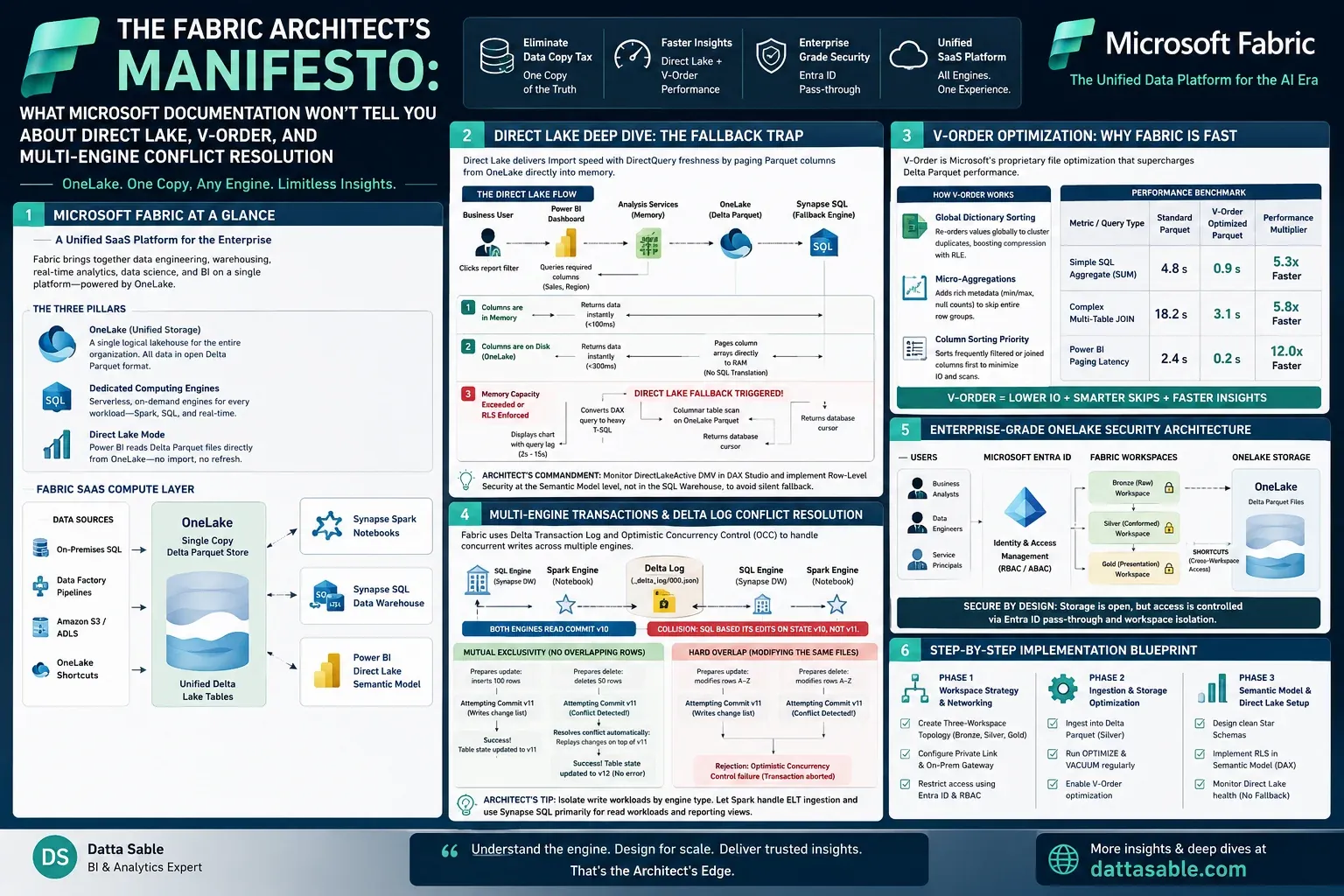
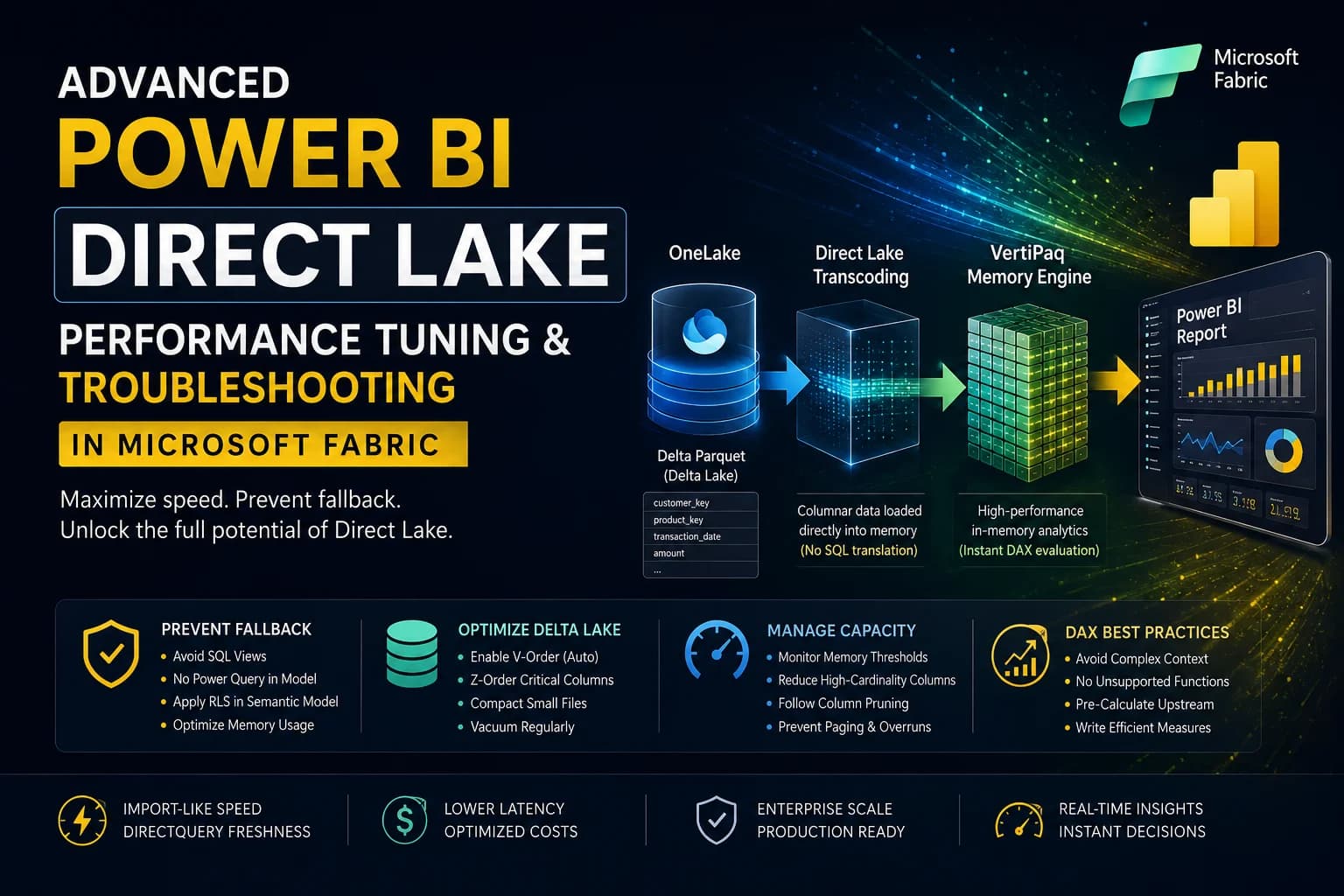
At its heart, Direct Lake mode operates on the principle of zero-copy data access. Unlike Import mode, where data is physically ingested and stored within the Power BI semantic model, and unlike DirectQuery where queries are translated and executed against the source system, Direct Lake mode reads directly from the source Delta tables in OneLake. The Power BI Analysis Services engine, which powers Power BI semantic models, has been enhanced to understand and directly consume the Delta Lake file format.
When a Direct Lake semantic model is queried, the Analysis Services engine does not send a query to an external database. Instead, it accesses the underlying Parquet files that constitute the Delta table in OneLake. It identifies the relevant file blocks, retrieves the necessary columns, and loads only those segments directly into its in-memory cache for immediate processing. This intelligent, on-demand caching mechanism provides several critical benefits:
Reduced Data Movement: Eliminates the need for traditional ETL processes to load data into a separate BI-optimized store.
Near Real-time Freshness: Changes committed to the Delta table in OneLake are almost immediately available to the semantic model, as there's no data refresh cycle to wait for.
Optimized Resource Utilization: Only the data required for a specific query is brought into memory, allowing for efficient handling of massive datasets that would be impractical for full Import mode.
Simplified Architecture: A single source of truth in OneLake minimizes data sprawl and simplifies data governance.
The Role of Delta Lake and OneLake
Direct Lake mode's functionality is deeply intertwined with two foundational components of Microsoft Fabric: OneLake and the Delta Lake open-source format.
OneLake acts as the singular, unified, logical data lake for an entire organization within Microsoft Fabric. Every workspace in Fabric implicitly creates a folder within OneLake, providing a single data experience regardless of where the data originates (Lakehouse, Data Warehouse, KQL Database). It abstracts away the underlying storage (Azure Data Lake Storage Gen2), presenting a hierarchical namespace that unifies data storage and access. Direct Lake models leverage OneLake's ability to provide a consistent view of data, ensuring that Power BI always interacts with the latest version of the Delta tables.
Delta Lake is the open-source storage layer that brings ACID (Atomicity, Consistency, Isolation, Durability) transactions, scalable metadata handling, and unified batch and streaming data processing to data lakes. Delta tables, built on Parquet files, are the native format for Lakehouse tables in Fabric. Direct Lake mode's ability to directly read Delta tables means it inherently benefits from Delta Lake features such as:
ACID Transactions: Ensures data reliability and consistency, critical for analytical workloads.
Schema Enforcement and Evolution: Prevents common data quality issues and simplifies schema management.
Time Travel: Allows access to historical versions of data, useful for auditing or reproducing past analyses.
Optimized File Management: Delta Lake automatically manages underlying Parquet files, including compaction and indexing, which Direct Lake mode intelligently leverages.
Crucially, Direct Lake mode natively understands the Delta Lake transaction log. This log contains metadata about file additions, deletions, and schema changes. By reading this log, the Analysis Services engine can quickly identify what data has changed and efficiently update its in-memory cache, maintaining data freshness without a full scan.
Direct Lake vs. Import Mode vs. DirectQuery Mode: A Comparative Analysis
Understanding the nuances of each mode is critical for making informed architectural decisions. The following table provides a high-level comparison:
FeatureImport ModeDirectQuery ModeDirect Lake ModeData FreshnessAs fresh as last refresh (scheduled)Real-time (live queries)Near real-time (reflects Delta commits)Query PerformanceExcellent (in-memory)Moderate to Poor (depends on source DB)Excellent (intelligent in-memory caching)Data VolumeLimited by PBI capacity (e.g., 400 GB)Virtually unlimited (pushed to source)Virtually unlimited (pushed to OneLake)Data DuplicationYes (data copied into PBI model)No (queries against source)No (reads directly from OneLake)ETL RequirementsHigh (load, transform, refresh)Low (transformations pushed to source)Low (transformations in Lakehouse)SecurityPBI RLS/OLS, PBI tenant settingsSource DB RLS/OLS, PBI RLS/OLS (composite)PBI RLS/OLS, OneLake security (shared)Cost ImplicationsPBI capacity (model storage, refresh cycles)PBI capacity (query CPU), Source DB computePBI capacity (query CPU), OneLake storageComplexityModerate (data pipelines, refresh schedules)Moderate (source DB optimization, query plans)Low to Moderate (Delta table opt., fallback mgmt.)Use CasesFixed datasets, aggregated reportingOperational reports, transactional viewsLarge-scale analytics, real-time dashboards
Decision Matrix:
Choose Import Mode when data volume is manageable, data freshness requirements allow for scheduled refreshes, and absolute maximum query performance is paramount.
Choose DirectQuery Mode when extreme data freshness is non-negotiable, source system performance is robust, or data volumes far exceed Power BI capacity limits, accepting potential performance trade-offs.
Choose Direct Lake Mode when you need the speed of Import mode, the freshness of DirectQuery, for massive datasets stored in OneLake (Delta tables), minimizing data duplication and simplifying architecture. This is the sweet spot for modern enterprise lakehouse analytics.
Decoding Direct Lake Fallback: Causes, Prevention, and Mitigation
Direct Lake mode offers unparalleled advantages, but its Achilles' heel is the phenomenon of "fallback." When a Direct Lake semantic model encounters certain conditions or queries, it may revert to DirectQuery mode. This transition, often subtle to the end-user, can significantly degrade performance, negating the primary benefit of Direct Lake.
What is Direct Lake Fallback?
Direct Lake fallback occurs when the Power BI Analysis Services engine, instead of processing data directly from its intelligently cached segments of OneLake Delta tables, decides to generate and execute a DirectQuery against the underlying Lakehouse (which in turn queries the Delta table). This means the query leaves the in-memory engine, travels to the Lakehouse compute, waits for execution, and then returns results. The implications are severe:
Performance Degradation: Queries become much slower, potentially adding seconds or even minutes to response times.
Increased Resource Consumption: The Lakehouse compute (e.g., Spark engine) is engaged, consuming its resources, which can impact other workloads.
Inconsistent User Experience: Users experience sporadic performance, sometimes fast, sometimes slow, leading to frustration and distrust in the data platform.
Higher Costs: Engaging more compute resources translates to increased consumption and higher costs.
Common Causes of Fallback to DirectQuery
Understanding the triggers is the first step towards elimination. Fallback can occur at the semantic model level (the entire model switches) or at the query level (specific visuals or interactions trigger DirectQuery).
Unsupported DAX Functions and Complex Calculations: Certain DAX functions or calculation patterns are inherently not push-down capable to the Direct Lake engine's optimized processing. Examples include:
Complex time intelligence functions requiring specific calendar tables or intricate
CALCULATEpatterns that cannot be fully optimized.Functions requiring a full materialization of intermediate tables (
SUMMARIZECOLUMNSused for aggregation that can't be optimized, certainFILTERcontexts).Measures that perform row-by-row operations across a large number of rows that the engine deems too expensive to process in-memory without a full scan.
Using functions like
APPROXCOUNTDISTINCTwhich might not have an optimal push-down equivalent.
External Data Sources (Composite Models): If a Direct Lake semantic model includes tables from other sources (e.g., a SQL database, another Power BI dataset) via a composite model, any query involving relationships between the Direct Lake tables and these external tables will force DirectQuery mode for the entire query segment.
Data Model Complexities:
High Cardinality Relationships: While not always a direct fallback cause, extremely high cardinality dimensions, especially on the 'many' side of relationships, can make in-memory caching inefficient and push the engine towards DirectQuery.
Bidirectional Relationships: These can create ambiguity and complex query plans, often leading to fallback.
Calculated Tables/Columns: If a calculated table or column relies on data that cannot be directly resolved via Direct Lake (e.g., complex M expressions that aren't folded or DAX expressions requiring a full scan), it might trigger fallback.
Security Configurations (RLS/OLS): While Direct Lake supports Row-Level Security (RLS) and Object-Level Security (OLS), overly complex or dynamic RLS rules that require intricate filtering or involve functions not easily pushed down to the underlying Delta table might force fallback. For example, RLS rules based on complex subqueries or custom data security tables not directly linked to the Direct Lake table's native columns.
Hybrid Tables: These tables intentionally mix Direct Lake partitions (for historical data) with Import partitions (for hot, frequently changing data). Queries specifically targeting the Import partition are fast, but queries spanning both or primarily targeting the Direct Lake partition might still fallback if other conditions are met, or if the engine determines it's more efficient to use DirectQuery for the Direct Lake part of the hybrid table under specific load.
Query Plan Limitations: The Analysis Services engine has an optimizer. In some rare cases, for an exceedingly complex or resource-intensive query, the engine might determine that executing it as a DirectQuery against the Lakehouse is more efficient or less prone to memory exhaustion than attempting to fully process it in Direct Lake mode.
Strategies for Fallback Elimination (Enterprise Best Practices)
Proactively designing and optimizing your Direct Lake solutions is key to minimizing or eliminating fallback.
Data Layer Optimization (OneLake & Delta Lake):
V-Order (Order for V-Engine): This is perhaps the most critical optimization for Direct Lake. V-Order is a write optimization for Delta Lake tables in OneLake that reorganizes the underlying Parquet files to improve data read performance, especially for columnar engines like Analysis Services. It optimizes data layout for maximum parallelism and efficiency. Always V-Order your Delta tables used by Direct Lake models.
-- Example of V-Ordering a Delta table
OPTIMIZE TABLE your_lakehouse.your_table_name
VORDER;

-- For existing tables, apply V-Order as part of your data ingestion/maintenance process.
-- Consider re-V-ordering periodically if data churn is high or if new columns are frequently added.
Optimal File Sizes and Compaction: Delta tables, especially with frequent appends, can accumulate many small files. Small files lead to increased I/O overhead. Target file sizes between 128MB and 1GB. Regularly run
OPTIMIZEcommands to compact small files into larger ones.-- Example of optimizing and compacting files OPTIMIZE your_lakehouse.your_table_name WHERE date_column = '2023-01-01'; -- Target specific partitions for efficiencyEffective Partitioning: Partition your Delta tables logically (e.g., by date for time-series data). This allows Direct Lake to prune irrelevant partitions, reducing the amount of data it needs to scan.
Semantic Model Design Best Practices:
Star Schema is King: Adhere strictly to the star schema methodology. Fact tables for measures, dimension tables for attributes. This structure is inherently optimized for analytical queries and push-down operations.
Simplify Relationships: Use single-direction, many-to-one relationships whenever possible. Avoid complex bidirectional relationships unless absolutely necessary, and understand their performance implications.
Reduce Cardinality: High cardinality columns, especially in dimension tables, can impact performance. Consider pre-aggregating or creating surrogate keys to reduce cardinality where appropriate.
Remove Unnecessary Columns/Tables: Only include what's needed for analysis. Lean models perform better.
DAX Optimization and Measure Design:
Write Efficient DAX: Prefer iterator functions like
SUMXoverSUMMARIZECOLUMNSwhen the latter creates an intermediate table that can't be pushed down. Understand filter context propagation.Pre-calculate Complex Measures: If a measure is computationally intensive and doesn't require real-time recalculation, consider pre-calculating it in your Delta Lake layer using Spark or SQL and storing it as a column in your fact table. This pushes the computation effort to the ELT pipeline.
Avoid Row-Level Calculations that Force Materialization: Be mindful of DAX that requires scanning an entire table or creating large intermediate tables in memory. These are prime candidates for fallback.
Utilize
ISINDIRECTLAKE(): This DAX function is invaluable for debugging. It returnsTRUEif the query is executing in Direct Lake mode andFALSEif it has fallen back to DirectQuery. Incorporate it into diagnostic measures.IsDirectLakeMode = ISINDIRECTLAKE()Then, simply add
IsDirectLakeModeto a card visual in your report to instantly see the query mode.
Security Implementation:
Streamlined RLS/OLS: Design RLS rules to be as simple and direct as possible. Base them on columns that exist directly in your Direct Lake tables and can be easily filtered by the engine. Avoid complex subqueries or DAX logic that cannot be efficiently pushed down.
Test RLS Thoroughly: Always test your RLS rules under various user contexts to ensure they don't inadvertently trigger fallback.
Monitoring and Debugging:
Power BI Performance Analyzer: Use this tool to identify slow visuals and the DAX queries they generate. This helps pinpoint problematic measures.
DAX Studio: A powerful external tool to analyze DAX queries, view query plans, and diagnose performance bottlenecks. It can show if a query is executing in Direct Lake or DirectQuery mode. The Server Timings panel is essential.
Fabric Monitoring Hub: Utilize Fabric's native monitoring capabilities to track query performance, capacity utilization, and identify if Direct Lake queries are frequently falling back. Look for spikes in Lakehouse compute usage when Direct Lake models are being queried.
Enterprise Performance Tuning for Direct Lake Semantic Models
Achieving peak performance with Direct Lake mode in an enterprise environment requires a holistic approach, optimizing every layer from the raw data in OneLake to the semantic model and query execution.
Data Layer Optimizations (OneLake & Delta Lake)
These optimizations are foundational, as Direct Lake mode directly consumes your Delta tables.
V-Order: The Cornerstone of Performance: Reiterate that V-Order (Vertical Order) is not optional for Direct Lake. It's a key optimization for Parquet files underlying Delta tables that enables superior read performance for columnar analytical engines. When data is V-Ordered, it is physically co-located and sorted in a way that minimizes I/O and maximizes the efficiency of vectorized query execution. This is critical for Direct Lake's ability to efficiently fetch only the necessary column segments.
-- Always V-Order your production Delta tables regularly, especially after major data ingestion.
OPTIMIZE your_lakehouse.your_fact_table VORDER;
OPTIMIZE your_lakehouse.your_dimension_table VORDER;
For highly dynamic tables, consider running V-Order as part of your nightly or weekly maintenance pipelines. For static dimension tables, a one-time V-Order after initial load might suffice.
Optimal File Sizes and Compaction: Small files in Delta Lake lead to excessive metadata processing and increased I/O. Conversely, extremely large files can hinder parallelism. Aim for file sizes between 128MB and 1GB. Implement compaction strategies:
OPTIMIZECommand: UseOPTIMIZEto compact small files. Combine withWHEREclauses for incremental optimization.Auto-Compaction in Spark: Configure Spark to auto-compact small files during write operations if using Spark for data ingestion.
Partitioning Strategies: Effective partitioning reduces the amount of data the Direct Lake engine needs to scan. For time-series data, partitioning by
year/month/dayis highly effective. For other data, partition by low-cardinality, frequently filtered columns.-- Example Delta table creation with partitioning CREATE TABLE your_lakehouse.your_partitioned_table (id INT, value STRING, event_date DATE) USING DELTA PARTITIONED BY (event_date); -- Will create year/month/day foldersDelta Lake Caching (Spark Side): While Direct Lake has its own caching, ensuring your Delta Lake data is optimally managed on the Spark side can indirectly aid performance. Using
CACHE TABLEin Spark for frequently accessed dimensions can speed up ETL/ELT processes that populate or prepare data for Direct Lake, especially in hybrid scenarios or during complex transformations.
Semantic Model Design Best Practices
Beyond data layer optimizations, the design of your Power BI semantic model is paramount.
Strict Star Schema Enforcement: Reinforce star schema principles. Fact tables should contain measures and foreign keys. Dimension tables should contain descriptive attributes. Avoid snowflake schemas unless absolutely necessary, and simplify them where possible.
Minimize Model Size:
Remove Unused Columns/Tables: Before publishing, remove any columns or tables not used in your reports or measures. Less data means faster processing and smaller memory footprint.
Optimize Data Types: Use the smallest appropriate data type. For example,
Whole NumberoverDecimal Numberif no fractional values are needed.DateoverDateTimeif time components aren't relevant.Categorize Columns: Properly categorize columns (e.g., as Latitude, Longitude, Image URL) to hint Power BI about their usage.
Efficient Measure Design (DAX):
Iterators vs. Aggregators: Understand when to use
SUMX(row-by-row iteration) versusSUM(column aggregation).SUMis generally faster for simple aggregations. UseSUMXwhen row-context calculations are required.Avoid
VARSprawl in Complex Measures: WhileVARhelps readability and debugging, overuse or inefficient use in deeply nested measures can sometimes lead to performance overhead if not properly optimized by the engine.Leverage
KEEPFILTERS: UseKEEPFILTERSsparingly and only when necessary to modify filter context without overriding existing filters. Misuse can lead to performance issues.Testing with DAX Studio: Regularly profile your most complex measures using DAX Studio to identify bottlenecks and fallback events.
Relationship Management:
Single-Direction, Many-to-One: This is the default and most performant relationship type. Direct Lake mode excels with these.
Avoid Bidirectional Filters: These can introduce ambiguity and force complex query plans that are harder to optimize for Direct Lake. If truly necessary, encapsulate their use carefully.
Proper Cardinality: Ensure relationships are defined with correct cardinality (e.g., Many to One for dimension-fact joins). Incorrect cardinality can lead to incorrect results or performance issues.
Query Performance and Caching Strategies
Power BI Visual Optimizations:
Limit Visuals per Page: Too many visuals on a single page generate a multitude of concurrent queries, straining capacity.
Optimize DAX for Each Visual: Each visual executes its own DAX. Ensure the DAX used by visuals is efficient and avoids fallback.
Use Aggregations (for Import/Hybrid): While Direct Lake directly accesses granular data, for very high-level dashboards, pre-defined aggregations on top of Direct Lake tables (which then become Import mode tables) can provide lightning-fast performance for summary data, while Direct Lake handles drill-through.
Analysis Services Cache Management: The Analysis Services engine in Power BI Premium/Fabric automatically caches data segments loaded from OneLake. This cache is crucial for Direct Lake performance.
Warm-up Queries: For critical dashboards, consider implementing automated warm-up queries (e.g., via Power Automate or custom scripts) to pre-load key data into the cache before users access reports, ensuring a fast initial experience.
Understand Cache Invalidation: The cache invalidates automatically when changes are detected in the underlying Delta table's transaction log. No manual refresh is typically needed.
Fabric Capacity Management: Choosing and scaling the right Fabric capacity (F-SKU or P-SKU) is vital.
Monitor Capacity Metrics: Use the Fabric Capacity Metrics App and Azure Log Analytics to monitor CPU, memory, and query execution times. Pay close attention to Direct Lake query patterns vs. DirectQuery fallback events.
Right-sizing: Adjust your capacity SKU based on peak usage and performance requirements. Under-provisioning leads to bottlenecks, while over-provisioning is costly.
Implementing Robust RLS/OLS for Direct Lake
Row-Level Security (RLS) and Object-Level Security (OLS) are enterprise necessities. Direct Lake supports them, but careful implementation is key to avoid fallback.
Dynamic RLS Best Practices:
Simplify Rules: Aim for simple
[TableColumn] = USERNAME()or[TableColumn] IN SELECTCOLUMNS(FILTER(...), ...)patterns that can be easily pushed down.Leverage Dimension Tables: Apply RLS filters on dimension tables rather than large fact tables, which often allows for more efficient filtering.
Avoid Complex Subqueries/Lookups: If your RLS rule requires joining to a complex security table or executing computationally intensive DAX to determine filter context, it's a candidate for fallback.
Example RLS DAX:
// Simple RLS on a 'Sales Region' dimension table
'Sales Region'[Region Manager Email] = USERNAME()
// More complex RLS, but still optimized for pushdown 'Product'[Product Category ID] IN SELECTCOLUMNS( FILTER('UserSecurity', 'UserSecurity'[User Email] = USERNAME() ), "Category ID", 'UserSecurity'[Allowed Category ID] )Ensure
UserSecuritytable is small and well-indexed, ideally in Import mode or efficiently linked.
Object-Level Security (OLS): OLS can hide sensitive columns or tables entirely. It is generally well-supported by Direct Lake as it impacts metadata rather than data access patterns, but always test thoroughly.
Advanced Scenarios and Operational Excellence (2026 Perspective)
As organizations mature their Fabric adoption, advanced scenarios and robust operational practices become critical for maximizing Direct Lake's value.
Hybrid Tables and Strategic Partitioning
While Direct Lake excels at near real-time insights on large datasets, there are scenarios where combining modes offers optimal performance and freshness:
Hot/Cold Data Strategy: Implement hybrid tables where the most recent 'hot' data (e.g., last 30 days) is in Import mode for absolute fastest query times and frequent updates, while historical 'cold' data is in Direct Lake mode. This requires careful partitioning and refresh management.
Partitioning Example: Create partitions for each month/year. The latest month's partition is set to Import mode and refreshed frequently. Older partitions are set to Direct Lake mode. This configuration is managed within the Power BI semantic model via Power Query transformations and incremental refresh policies.
Scenario: High-traffic operational dashboards needing sub-second latency for the current day's transactions, but historical analysis can tolerate slightly higher latencies. The hybrid approach gives the best of both worlds.
CI/CD and DevOps for Direct Lake Solutions
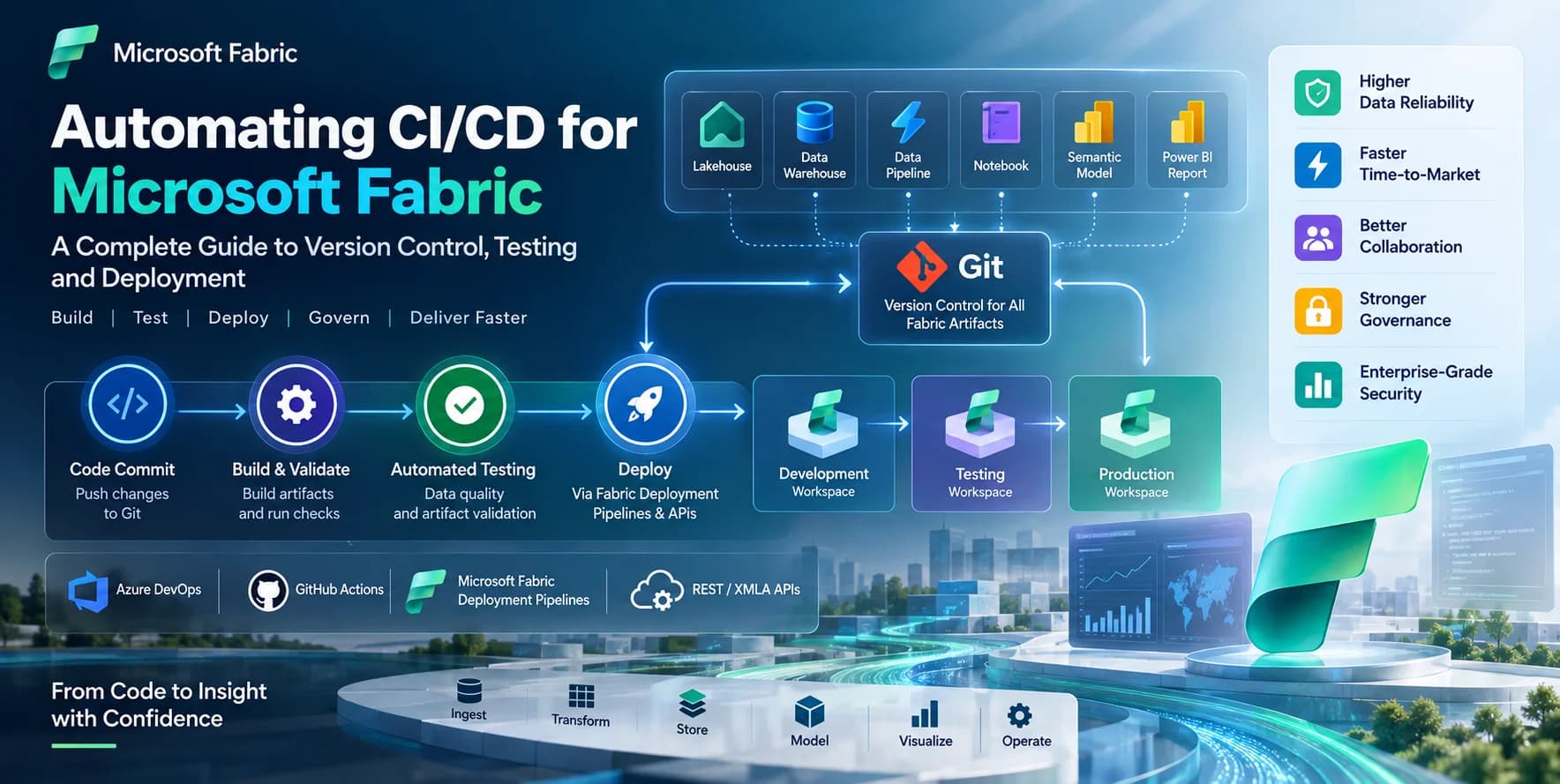
Enterprise-grade solutions demand automation and version control. Incorporating Direct Lake models into CI/CD pipelines is essential.
Source Control for Semantic Models: Store your Power BI semantic model definition (e.g., using Tabular Editor 3's BIM file or Power BI Project files
.pbip) in Git repositories. This allows for version control, collaborative development, and change tracking.Automated Deployment: Utilize Fabric APIs, Power BI REST APIs, and Azure DevOps or GitHub Actions to automate:
Semantic Model Deployment: Deploying updated semantic models to target workspaces.
Parameter Management: Handling environment-specific parameters (e.g., Lakehouse names, authentication details).
Capacity Assignment: Ensuring the semantic model is assigned to the correct Fabric capacity.
Automated Testing:
Functional Testing: Ensure reports display correct data after deployment.
Performance Testing: Include tests to validate query performance and, critically, detect any unintended DirectQuery fallbacks post-deployment. Use tools like
Measure-DaxQueryin PowerShell orDax.Queryin Python with theISINDIRECTLAKE()measure to assert query modes.
Data Pipeline Integration: Ensure your data ingestion and transformation pipelines (e.g., using Fabric Data Pipelines, Spark notebooks) are integrated with your Direct Lake semantic model updates. Any schema changes in the Delta tables must be reflected in the semantic model, and automated validation can prevent breakage.
Monitoring and Alerting for Direct Lake Performance
Proactive monitoring is non-negotiable for maintaining enterprise service levels.
Fabric Monitoring Hub: The central place for monitoring Fabric workloads. Track:
Compute Utilization: Monitor CPU and memory usage of your Fabric capacity to identify bottlenecks.
Query Performance: Analyze query durations, distinguishing between Direct Lake and DirectQuery operations. Look for trends in fallback events.
OneLake I/O: Monitor read/write operations on your OneLake storage.
Azure Log Analytics Integration: Export Fabric activity logs to Azure Log Analytics for more detailed analysis, custom dashboards, and advanced alerting. You can create KQL queries to:
Identify queries that frequently fall back to DirectQuery.
Alert on semantic models experiencing prolonged slow query times.
Track data freshness by monitoring Delta Lake transaction log updates vs. semantic model query times.
Custom Dashboards and Alerts: Build Power BI reports on top of your monitoring data to provide real-time insights into the health and performance of your Direct Lake solutions. Configure alerts for deviations from performance baselines or increases in fallback rates.
Future-Proofing with Fabric Innovations (2026 Outlook)
The Microsoft Fabric platform is evolving rapidly. By 2026, we can anticipate further enhancements that will bolster Direct Lake mode's capabilities:
Enhanced Engine Optimizations: Continuous improvements to the Analysis Services engine's ability to process Delta Lake data, further reducing fallback triggers and increasing query efficiency.
Automated Tuning Features: Introduction of AI/ML-driven recommendations for V-Order, partitioning, and semantic model design, potentially with auto-apply options.
Advanced DAX Capabilities: New DAX functions or optimizations specifically designed for Direct Lake scenarios, enabling more complex calculations without compromising performance.
Broader Integration with OneLake Shortcuts: Seamless integration with OneLake shortcuts, allowing Direct Lake models to access data from external sources (e.g., ADLS Gen2, Amazon S3) without requiring data movement, albeit with careful performance considerations for non-Delta formats.
Improved Hybrid Table Management: More granular control and simpler management of hybrid table partitions, making it easier to implement complex hot/cold data strategies.
Staying abreast of these developments and proactively incorporating them into your architecture will ensure your Direct Lake solutions remain performant and scalable.
Frequently Asked Questions (FAQ)
Q1: Why are some of my Direct Lake queries falling back to DirectQuery despite following best practices?
A: Even with best practices, fallback can occur due to subtle interactions. First, re-verify all H3 sections under "Common Causes of Fallback." Pay close attention to: (1) Complex DAX measures – use DAX Studio to analyze the query plan; (2) Relationship issues – ensure all relationships are simple many-to-one and active; (3) Underlying data issues – high cardinality on unexpected columns, or inconsistent data types in Delta tables not perfectly aligning with the semantic model definition. Use ISINDIRECTLAKE() extensively in diagnostic measures. Also, check Fabric capacity health; extreme pressure can sometimes push the engine to DirectQuery if in-memory resources are severely constrained.
Q2: How does V-Order impact Direct Lake performance, and how often should I run OPTIMIZE ... ZORDER BY?
A: V-Order significantly improves Direct Lake performance by physically co-locating and organizing data within Parquet files, optimizing for columnar reads. It's especially effective for ORDER BY, GROUP BY, and JOIN operations. For Direct Lake, V-Order is equivalent to ZORDER BY on all columns that are frequently filtered, grouped, or joined. You should run OPTIMIZE ... VORDER (or ZORDER BY) for any Delta table consumed by Direct Lake. The frequency depends on data churn: for heavily appended tables, run it as part of your nightly or weekly ETL/ELT process. For static or slowly changing dimension tables, a one-time V-Order after initial load or infrequent re-runs after significant schema changes might suffice.
Q3: Can I combine Direct Lake with other data sources in a composite model?
A: Yes, Direct Lake models can be part of a composite model, allowing you to combine Direct Lake tables (from OneLake) with tables from other DirectQuery sources (e.g., Azure SQL Database) or Import mode tables. However, this comes with important considerations: any query involving relationships between Direct Lake tables and non-Direct Lake tables will likely cause the entire query to fall back to DirectQuery mode for the relevant parts. This can severely impact performance. Use composite models with Direct Lake sparingly and only when the performance implications of fallback for cross-source queries are acceptable or for specific, isolated scenarios.
Q4: What's the best way to monitor Direct Lake semantic model performance and diagnose issues?
A: The best approach is multi-faceted: (1) Fabric Monitoring Hub: Start here for overall capacity health and high-level query activity. (2) Azure Log Analytics: Export Fabric activity logs for detailed, granular telemetry. Build KQL queries to specifically track DirectLakeQuery events versus DirectQuery events, measure query durations, and identify recurring fallback patterns. (3) DAX Studio: For deep-dive query analysis, connect DAX Studio to your semantic model. Use Server Timings to view query plans, identify specific DAX expressions causing performance bottlenecks, and confirm if ISINDIRECTLAKE() is TRUE or FALSE for specific queries. (4) Power BI Performance Analyzer: Identify slow visuals within reports. Combine these tools to get a comprehensive view from high-level capacity down to individual DAX query execution.
Summary & Next Steps
Microsoft Fabric's Direct Lake mode represents a significant leap forward in enterprise analytics, offering an elegant solution to the perennial trade-off between data freshness and query performance. By leveraging the unified architecture of OneLake and the robust capabilities of Delta Lake, Direct Lake mode empowers organizations to deliver near real-time insights on massive datasets with unprecedented efficiency.
However, unlocking Direct Lake's full potential is not a passive endeavor. It demands a deep understanding of its architecture, meticulous attention to preventing DirectQuery fallback, and continuous optimization across the entire data estate. From implementing V-Order on your Delta tables to crafting efficient DAX and designing star-schema-compliant semantic models, every optimization contributes to a superior analytical experience.
As we look towards 2026, the ongoing evolution of Microsoft Fabric promises even greater capabilities and efficiencies for Direct Lake mode. Proactive engagement with these technologies, coupled with robust CI/CD, comprehensive monitoring, and a commitment to operational excellence, will be key differentiators for data-driven enterprises.
Next Steps:
Pilot a Direct Lake Project: Start with a well-defined, critical dataset in your Lakehouse. Migrate a single semantic model to Direct Lake mode and rigorously test its performance and fallback behavior.
Implement V-Order: Ensure all Delta tables destined for Direct Lake consumption are consistently V-Ordered as part of your data pipeline.
Establish Monitoring: Set up detailed monitoring in Azure Log Analytics to track Direct Lake performance and identify any fallback events immediately.
Deepen DAX Knowledge: Invest in advanced DAX training and utilize tools like DAX Studio to optimize your measures and prevent common fallback triggers.
Review Data Architecture: Assess your existing data lake architecture for alignment with Fabric Lakehouse best practices and opportunities to consolidate data in OneLake Delta tables.